Introduction
The control unit of the WeatherLox weather station is based on an ESP32 with ESP-Easy firmware. The ESP32 communicates with the outside world via WiFi. The firmware has been adapted for this project and extended with comprehensive “rules” for processing the measured weather data.
The weather station was primarily developed and prepared for the Loxone smart home system. However, it can be used with any system that can receive data via UDP, HTTP, MQTT or the Ecowitt data format. These include:
- Loxone
- Home Assistant
- ioBroker
- Node-RED
- Homematic
- And many more…
Thanks to the support of the Ecowitt format, the weather station can also be used with a large number of common software for recording and analysing weather data. These include:
- FOSHKplugin by Oliver Engel
- PC-Wetterstation by Werner Krenn
- WeeWX
- And many more…
Available measurements
The table shows all values that the weather station provides when fully equipped, i.e. with all sensor modules. Which values your station actually outputs depends on which modules you connect. The first column shows which module a value comes from.
The weather service values are fetched by the control unit from Open-Meteo via the internet. Temperatures 1 to 4 come from optional 1-Wire temperature probes that are connected directly to the control unit.
| Module | Variable | Unit | Source | Description |
|---|---|---|---|---|
| Air Sensor Module | temperature | °C | Measurement | Outside temperature |
| temperature_avg2m | °C | Calculated | Ø temperature 2 min | |
| temperature_avg10m | °C | Calculated | Ø temperature 10 min | |
| dewpoint | °C | Calculated | Dew point | |
| feelslike | °C | Calculated | Feels-like temperature | |
| heatindex | °C | Calculated | Heat index | |
| humidity | % | Measurement | Rel. humidity | |
| humidity_abs | g/m³ | Calculated | Abs. humidity | |
| pressure_abs | hPa | Measurement | Air pressure absolute | |
| pressure_rel | hPa | Calculated | Air pressure relative | |
| pressure_trend_1h | Calculated | Air pressure trend 1h | ||
| pressure_trend_3h | Calculated | Air pressure trend 3h | ||
| vapourpressuredeficit | hPa | Calculated | Vapour pressure deficit | |
| pressure_change_1h | hPa | Calculated | Air pressure change 1h | |
| pressure_change_3h | hPa | Calculated | Air pressure change 3h | |
| cloudbase | m | Calculated | Cloud base (cumulus) | |
| Solar Sensor Module | illuminance | Lx | Measurement | Brightness |
| solarradiation | W/m² | Measurement | Solar radiation | |
| solarradiation_daily | Wh/m² | Measurement | Solar radiation current day | |
| sunduration_daily | h | Measurement | Sunshine duration current day | |
| sunshine | 0/1 | Measurement | Sunshine present | |
| twilight | % | Measurement | Twilight | |
| uvi | Measurement | UV index | ||
| sunelevation | ° | Calculated | Sun elevation | |
| sundirection | ° | Calculated | Sun direction (azimuth) | |
| Lightning Sensor Module | lightning_time | – | Measurement | Time of the last lightning event |
| lightning_num_daily | – | Measurement | Number of lightning events current day | |
| lightning | km | Measurement | Distance of the last lightning event | |
| Windspeed Sensor Module | beaufort | Bft | Measurement | Wind force |
| windchill | °C | Calculated | Wind chill (feels-like temperature) | |
| windgust_max10m | km/h | Measurement | Max. wind gust last 10 min. | |
| windgust_max2m | km/h | Measurement | Max. wind gust last 2 min. | |
| windgust_maxdaily | km/h | Measurement | Max. wind gust current day | |
| windrun_daily | km | Measurement | Wind run current day | |
| windspeed | km/h | Measurement | Wind speed | |
| windspeed_avg10m | km/h | Measurement | Avg. wind speed last 10 min. | |
| windspeed_avg2m | km/h | Measurement | Avg. wind speed last 2 min. | |
| Winddirection Sensor Module | winddir | ° | Measurement | Wind direction |
| winddir_avg10m | ° | Measurement | Avg. wind direction last 10 min. | |
| winddir_avg2m | ° | Measurement | Avg. wind direction last 2 min. | |
| Rain Sensor Module | rainstate | 0/1 | Measurement | Rain state (rain/snow detected) |
| Rain Amount Sensor Module | rain_24h | mm | Measurement | Rain amount last 24 h |
| rain_daily | mm | Measurement | Rain amount current day | |
| rain_event | mm | Measurement | Rain amount current event | |
| rain_monthly | mm | Measurement | Rain amount current month | |
| rain_weekly | mm | Measurement | Rain amount current week | |
| rain_yearly | mm | Measurement | Rain amount current year | |
| rainrate | mm/h | Measurement | Rain rate | |
| Control Module (optional 1-Wire probes) | temperature1 | °C | Measurement | Temperature 1 (e.g. soil temperature) |
| temperature2 | °C | Measurement | Temperature 2 (e.g. soil temperature) | |
| temperature3 | °C | Measurement | Temperature 3 (e.g. soil temperature) | |
| temperature4 | °C | Measurement | Temperature 4 (e.g. soil temperature) | |
| Weather service Open-Meteo (internet required) | cloudcover | % | Weather service | Cloud cover |
| precipitationprob | % | Weather service | Current precipitation probability | |
| visibility | km | Weather service | Visibility | |
| weathercode | – | Weather service | Weather code (WMO) | |
| evapotranspiration | mm | Weather service | Evapotranspiration | |
| et0evapotranspiration | mm | Weather service | Reference evapotranspiration (ET0) |
Sensors used
The control unit of the weather station uses the following additional components to connect the various weather sensors:
ESP32-DevKitC V4 development board
The weather station uses the ESP32-DevKitC V4 development board with a WROOM-32U module and an external WiFi antenna.
Datasheet
Specification
- CPU and On-Chip Memory
- ESP32-D0WD embedded, Xtensa dual-core
32-bit LX6 microprocessor, up to 240 MHz - 448 KB ROM
- 520 KB SRAM
- 8 KB SRAM in RTC
- ESP32-D0WD embedded, Xtensa dual-core
- Integrated Components on Module
- 40 MHz crystal oscillator
- 4 MB SPI flash
- Wifi
- 802.11b/g/n
- Bit rate: 802.11n up to 150 Mbps
- A-MPDU and A-MSDU aggregation
- 0.4 µs guard interval support
- Center frequency range of operating channel: 2412 ~ 2484 MHz
- External Antenna
Analog-to-digital converter ADS1115
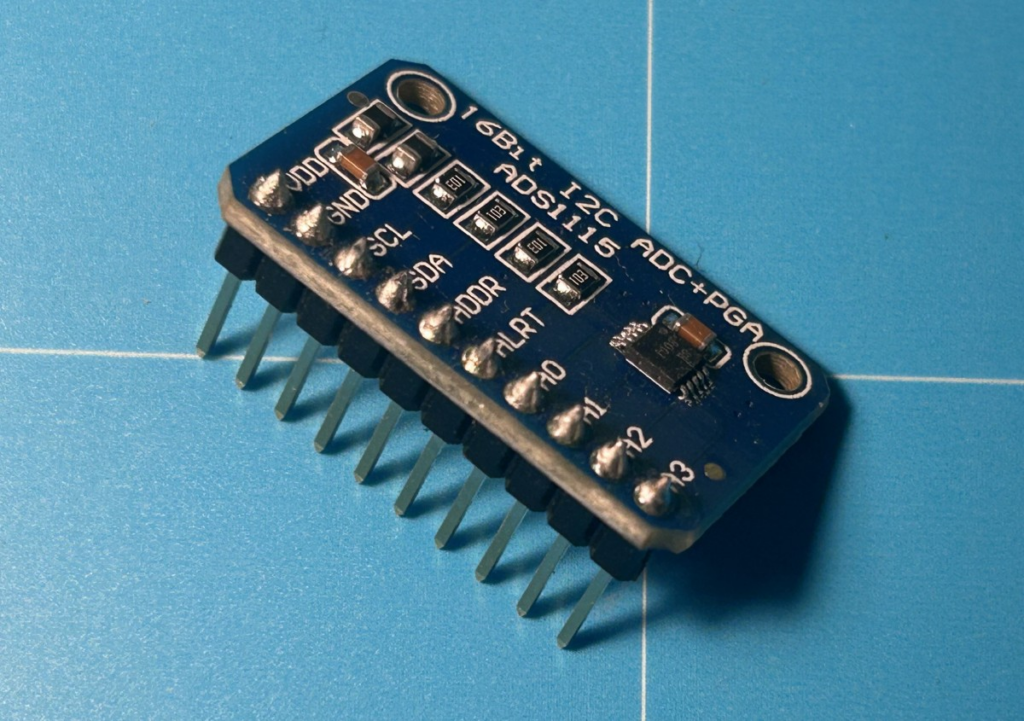
The analog-to-digital converter ADS1115 is used to connect various analog sensors. Compared to the analog inputs of the ESP32, this module offers higher accuracy.
Datasheet
Specification
- Resolution (Bits): 16
- Sample rate (max) (ksps): 0.86
- Number of input channels: 4
- Interface type: I2C
- Input voltage range (max) (V): 5.5
Voltage converter MP1584EN
The Control Module requires both 12V and 5V. You therefore need a voltage converter that additionally converts the 12V into 5V.
Datasheet
Specification
- Input voltage: 4.5–28 V
- Output voltage: 0.8–20 V
- Output current: rated current 3A (MAX).
- Switching frequency: 1.5 MHz (highest), typically 1 MHz
- Output ripple: < 30 mV
- Efficiency: 96 % (max.)
- Operating temperature: -40 °C to +85 °C
- Size: 22 mm * 17 mm
Parts list
Available as a kit
All necessary components of this guide are also available as a complete kit! The kit contains all individual components (except adhesives, solder, etc.), including the required PCBs and 3D printed parts. With your purchase you also support us in the further development of the DIY weather station.
Request a kit ›The following components are required to assemble the Control Module:
| Quantity | Component | Source |
|---|---|---|
| 1 pc. | Housing Control Module | see below |
| 40 cm | Sealing cord silicone rubber 2mm, round | Ali Express / Amazon |
| 4 pcs. | Stainless steel countersunk screw DIN7991 M4x20mm | Ali Express / Amazon / hardware store |
| 4 pcs. | Press-in nut / threaded insert M4x5x6mm | Ali Express / Amazon |
| 1 pc. | PCB Control Module | see below |
| 2 pcs. | Stainless steel countersunk screw Phillips M3x10mm | Ali Express / Amazon / hardware store |
| 1 pc. | Cable gland IP68 PG09 (M14) | Ali Express / Amazon / hardware store |
| 2 pcs. | Swivel pipe clamp 25-28mm / 3/4″ | Ali Express / Amazon / hardware store |
| 2 pcs. | Stainless steel countersunk screw DIN7991 M8x20mm | Ali Express / Amazon / hardware store |
| 2 pcs. | Stainless steel washer M8x16x1.5mm | Ali Express / Amazon / hardware store |
| 2 pcs. | Stainless steel hex nut M8 | Ali Express / Amazon / hardware store |
| 15 pcs. | PCB screw terminals 2 pin, 2.54mm | Ali Express / Amazon |
| 4 pcs. | PCB screw terminals 3 pin, 2.54mm | Ali Express / Amazon |
| 4 pcs. | Female header 1×2 pin, 2.54mm | Ali Express / Amazon |
| 1 pc. | Female header 1×10 pin, 2.54mm | Ali Express / Amazon |
| 2 pcs. | Female header 1×19 pin, 2.54mm | Ali Express / Amazon |
| 4 pcs. | Male header 1×2 pin, 2.54mm, 10.5mm | Ali Express / Amazon |
| 1 pc. | ESP32-DevKitC V4 development board with ext. antenna | Ali Express / Amazon |
| 1 pc. | Antenna compatible with ESP32-WROOM-32U, with cable | Ali Express / Amazon |
| 1 pc. | ADS1115 16 bit I2C module | Ali Express / Amazon |
| 1 pc. | MP1584EN DC-DC voltage converter 3A, 4.5-28V | Ali Express / Amazon |
| 2 pcs. | Resistor 1.5kOhm | Ali Express / Amazon |
| 2 pcs. | Resistor 2.2kOhm | Ali Express / Amazon |
| 1 pc. | Resistor 4.7kOhm | Ali Express / Amazon |
| 2 pcs. | Resistor 10kOhm | Ali Express / Amazon |
| 2 pcs. | Hex spacer / standoff M2, Thr 4mm, L 11mm | Ali Express / Amazon |
| 1 pc. | Power supply 12V / 2A | Ali Express / Amazon |
| 2 m | Stranded cable 2-core, 22AWG, UV-resistant | Ali Express / Amazon / hardware store |
| 4 pcs. | Cable ties 3x150mm, UV-resistant | Ali Express / Amazon / hardware store |
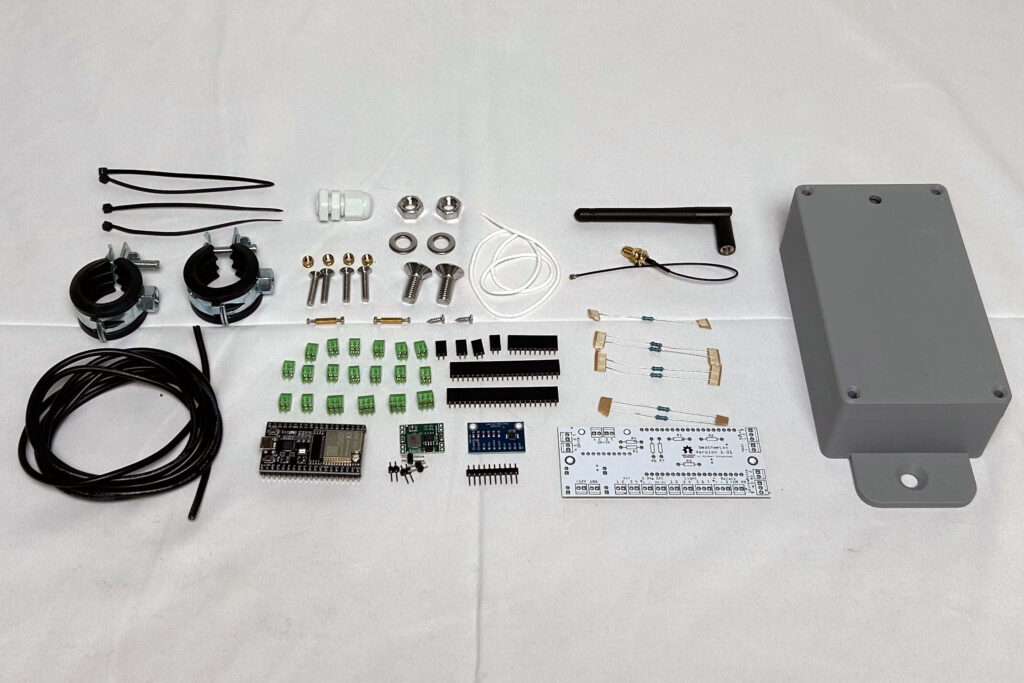
3D printed parts and PCB
Assembly requires a 3D printed housing that was developed specifically for this sensor. This housing is of course included in the kit. It can also be printed yourself, but you must make sure to use a weather-resistant, UV-resistant filament. ASA is particularly well suited, but unfortunately it is difficult to print.
The 3D print files can be downloaded here: https://github.com/mschlenstedt/WeatherLox/tree/main/case/weatherlox-esp

Furthermore, a PCB is required that holds the ESP32 and all other components and also provides all connections. This is of course also included in the kit. It can also be manufactured by a suitable PCB service. A rebuild on a perfboard is of course also possible.
The files (Gerber files, Fritzing, schematic, etc.) can be downloaded here: https://github.com/mschlenstedt/WeatherLox/tree/main/PCB/weatherlox-esp


Required tools and consumables
The following tools and additional consumables are required to assemble the sensor:
- Soldering iron, solder, etc. with the smallest possible soldering tip
- Small needle-nose pliers
- Phillips screwdriver, small
- Slotted screwdriver, mini
- Allen key 5mm
- 13 mm open-end wrench M8
- Wire stripper
- Tweezers (if needed)
- approx. 4-6mm wood drill (for pre-drilling)
- 12 mm countersink for wood and plastic
- Multimeter (an inexpensive one is perfectly sufficient)
- Jumper cables (only for testing the PCB)
- All-purpose adhesive (transparent and waterproof!), e.g. UHU or Patex
- PCB protective lacquer (for weather resistance – important!)
- Sikaflex 522 grey sealant and adhesive, UV-stable and weather-resistant, plus a caulking gun
PCB protective lacquer is available from electronics retailers or of course from Amazon/Ali Express and the like. Here are some examples:
- https://www.amazon.de/Isolierlack-Elektroniks-Transparent-Leiterplatten-Steuerplatinen/dp/B0G8GBC7WH
- https://www.amazon.de/Schutzbeschichtung-Schaltkreisdichtmittel-Komponentenisolierung-Feuchtigkeitsschutz-Platinenschutzlack/dp/B0G4JYSP42
- https://www.amazon.de/1DFAUL-Dichtungsmittel-feuchtigkeitsbest%C3%A4ndig-zuverl%C3%A4ssigen-elektronischer/dp/B0FH28QD3R
The required Sikaflex 522 adhesive is also available by mail order. You will need it at various points in other build instructions. Here are some examples of where to get it:
- https://www.amazon.de/dp/B09N7J125B
- https://dichtstofftechnik24.de/Shop/Sikaflex-522-1K-Polymer-Kleb-und-Dichtstoff-300ml-Kartusche-versch-Farben_1
- https://www.klebeshop24.de/Sikaflex-522-300-ml-Kartusche-stahlgrau
Assembly instructions
Prepare the control unit for all sensors
It makes sense to prepare the control unit directly for all planned sensors, i.e. to drill all the holes for the cable glands right away and also to pull in and connect the cables. Of course this can also be done later, but it involves considerably more effort.
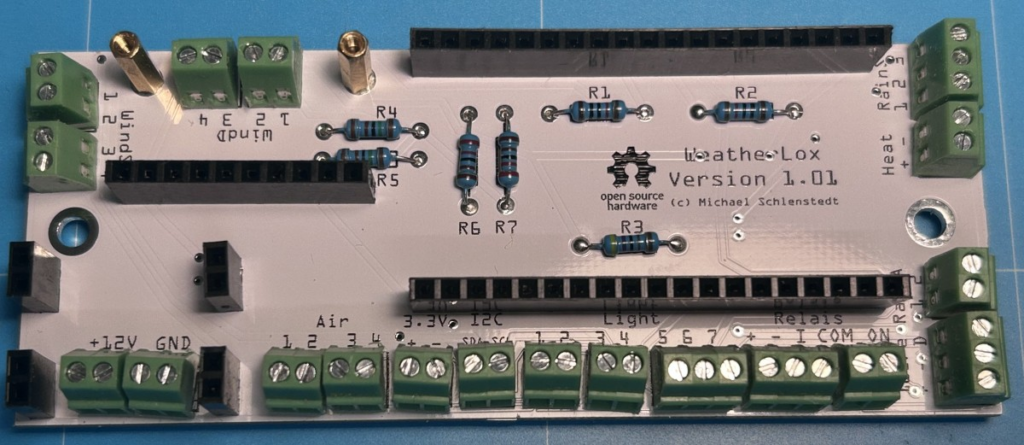
First, the PCB is assembled. To start, the 7 resistors are soldered in. The resistors have a colour code by which they can be identified. However, it is much easier, faster and above all safer with the multimeter! Set it to Ω (ohm) and connect the ends of the two test probes to one end of the resistor each. You can then conveniently read the resistance value on the display. Make absolutely sure to solder the resistors in the correct position! Then insert all resistors one after the other from above through the corresponding holes and bend the legs outwards on the underside of the PCB – this holds them in place. Then all legs are soldered from below and the excess is cut off with pliers.
- R1: 10 kΩ
- R2: 10 kΩ
- R3: 4.7 kΩ
- R4: 1.5 kΩ
- R5: 1.5 kΩ
- R6: 2.2 kΩ
- R7: 2.2 kΩ
Once that is done, the terminal blocks (15x 2-pin terminal, 4x 3-pin terminal) are soldered on one after the other. Finally, the female headers are soldered on. To align the female headers straight, first solder only one pin, then align the header by carefully bending it and then solder all the other pins.
The two hex spacers for the ADS1115 sensor are screwed on from below with the supplied nuts.
Now the 10-pin male header is soldered to the ADS1115 module and the four 2-pin male headers are soldered to the MP1584EN.
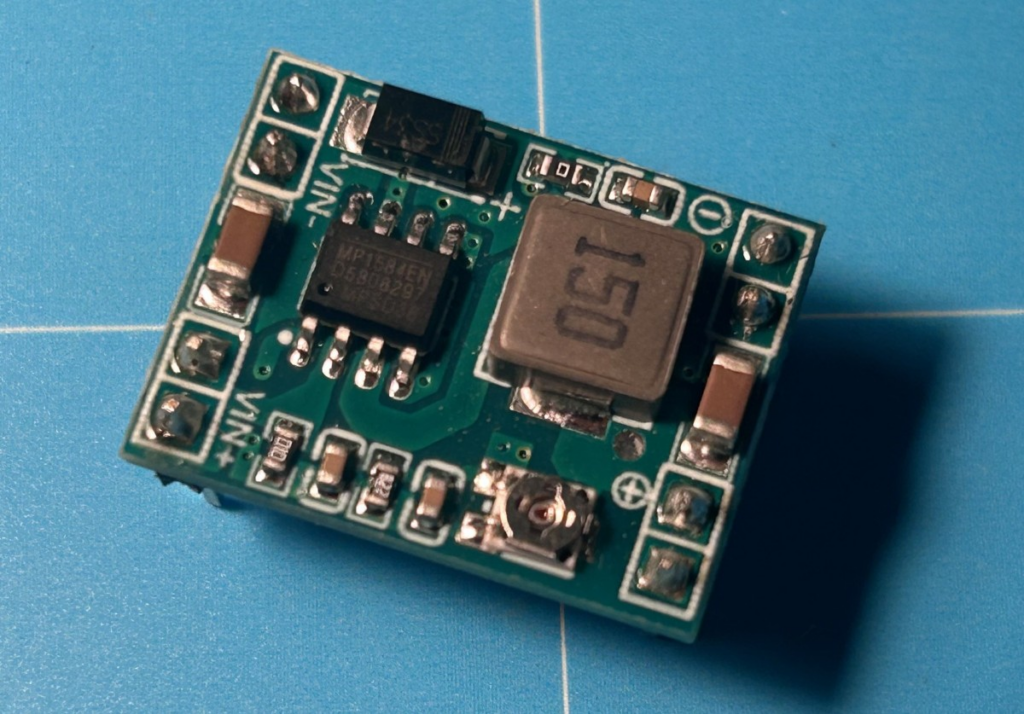
Now only and exclusively the MP1584EN module is inserted – the ESP32 and the ADS1115 are not inserted yet! The two connections marked “VIN-” and “VIN+” must point towards the outer edge of the PCB, the two circled symbols “+” (plus) and “-” (minus) point towards the centre of the PCB. The two terminals “+12V” and “GND” are connected to the power supply (before inserting the module), and after inserting the module the PCB is supplied with 12V. Now measure the voltage with the multimeter set to “DC volts” at the two pins with the circled symbols “+” (plus) and “-” (minus). Turn the small potentiometer on the module to the left or right until a voltage of as exactly 5V as possible is present at the pins (5.1V is also OK, but not less than 5V). Once the correct setting of the potentiometer has been found, the position is fixed with a drop of all-purpose adhesive on the potentiometer.

Now the soldering can be checked by random sampling! This is very important, because the following steps (applying the protective lacquer) cannot be undone! Again, only and exclusively the MP1584EN module is inserted – the ESP32 and the ADS1115 are not inserted yet! With the MP1584EN module inserted, the PCB is supplied with power. Using the multimeter (and a jumper cable if necessary) set to “DC volts”, the points marked in black, red, orange and yellow are now checked (see next figure).
- Black: ground / GND
- Yellow: 3.3 V
- Orange: 5 V
- Red: 12 V
Then disconnect the PCB from the power supply again and use the multimeter set to “continuity test” to check the electrical continuity between the markings with the same number.
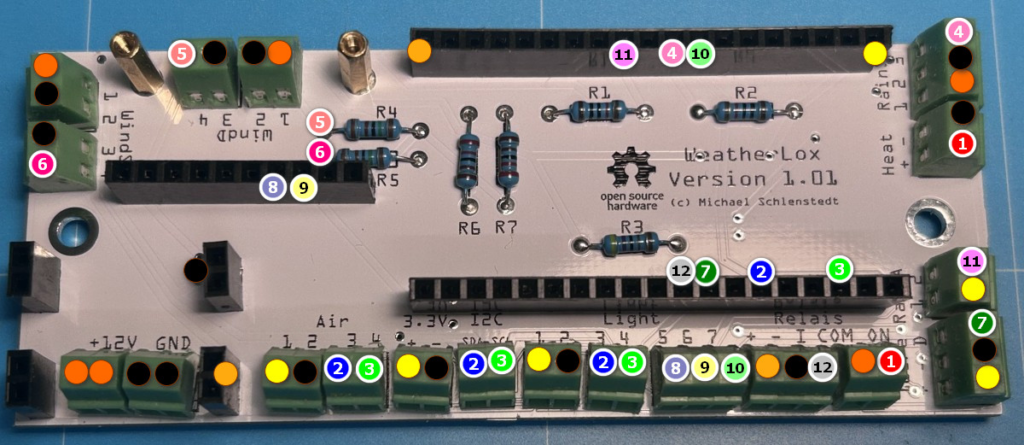
If everything is OK, the control unit is disconnected from the power supply again and the MP1584EN module is removed from the female header once more.
Now the PCB protective lacquer is applied to 3 PCBs – the PCB of the MP1584EN module, the PCB of the Control Module and the PCB of the ESP32. The PCB of the ADS1115 is left out for now until we have tested this sensor separately later. The PCBs are coated with the protective lacquer on both sides – but of course leave out all contact pins! Also make sure not to soil the two push buttons and the USB socket on the ESP32. The lacquer is very liquid and can be applied very well with a cotton swab by applying a drop and spreading it lightly. Repeat this process until the entire PCB is sufficiently covered with lacquer. Once the lacquer has been applied, soldering is no longer possible!
Once the board varnish has dried, the ADS1115 sensor and the MP1584EN module are inserted into the socket strips on the board again.
Now it is time to flash the firmware onto the ESP32. This is described in the guide 1. Initial Firmware Installation. Afterwards you also have to carry out the basic configuration (e.g. connect the ESP32 to your own WiFi). This is described in the chapter 2. Basic Configuration.
After flashing and configuring, the ESP32 is now also placed on the socket strips. The WiFi module with the small golden antenna connector must point towards the outside of the board, the USB connector points towards the centre of the board. Make sure the modules are arranged correctly as shown in the following picture!

Now the complete board including the add-on modules is powered for the first time.
To check whether the ADS1115 sensor is working correctly, now switch to the Devices tab and check under task 10 whether the sensor is activated (“Enabled”) and also shows readings. Alternatively, you can scan the I2C bus for the sensor by checking under Tools –> I2C Scan whether an “Analog input – ADS1x15” is found at address 0x48.

If all of this is OK, disconnect the PCB from the power supply, remove the ADS1115 sensor again and also coat it with the PCB protective lacquer. After drying, the ADS1115 sensor is plugged back onto the socket and screwed tight to the two hex spacers (standoffs) with the small supplied screws.
Now the housing is assembled. First, place the 2mm silicone sealing cord into the corresponding groove of the upper housing part. Make sure that the very stretchy cord is under no circumstances inserted under tension. It would contract again later and the sealing function would no longer be given. Especially in the corners there is a tendency to pull the cord in under tension! The cord is cut off with an overlap of approx. 2-3 mm. Then it is compressed a little and inserted under slight pressure. If it jumps out of the groove, try to press it back in. If that doesn’t work either, you have to cut off a little more of the cord and try again.
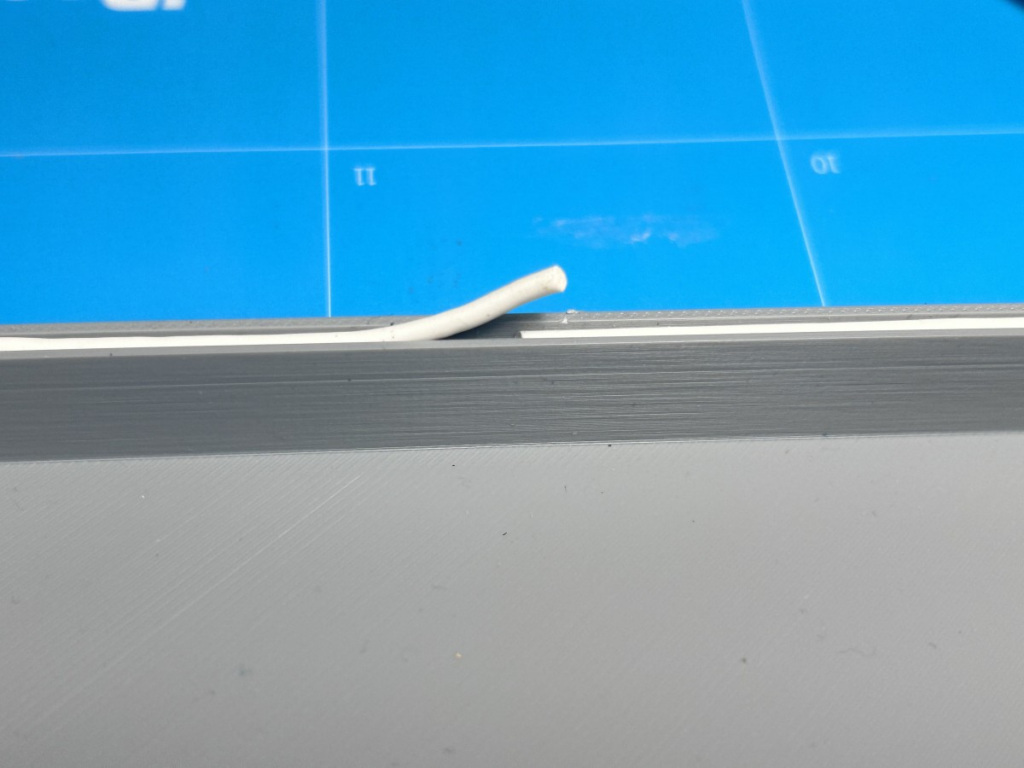
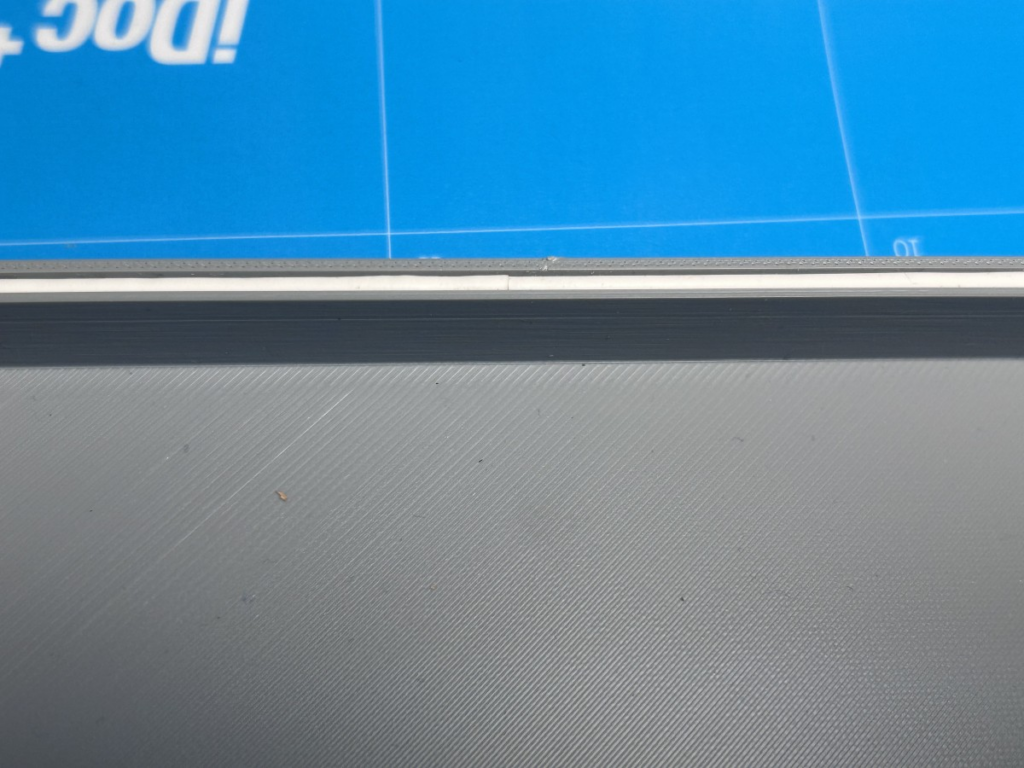
Next, the connector for the external antenna is pushed through the housing cover from the inside and screwed tight with the supplied nut. The washers that are also supplied are not used.
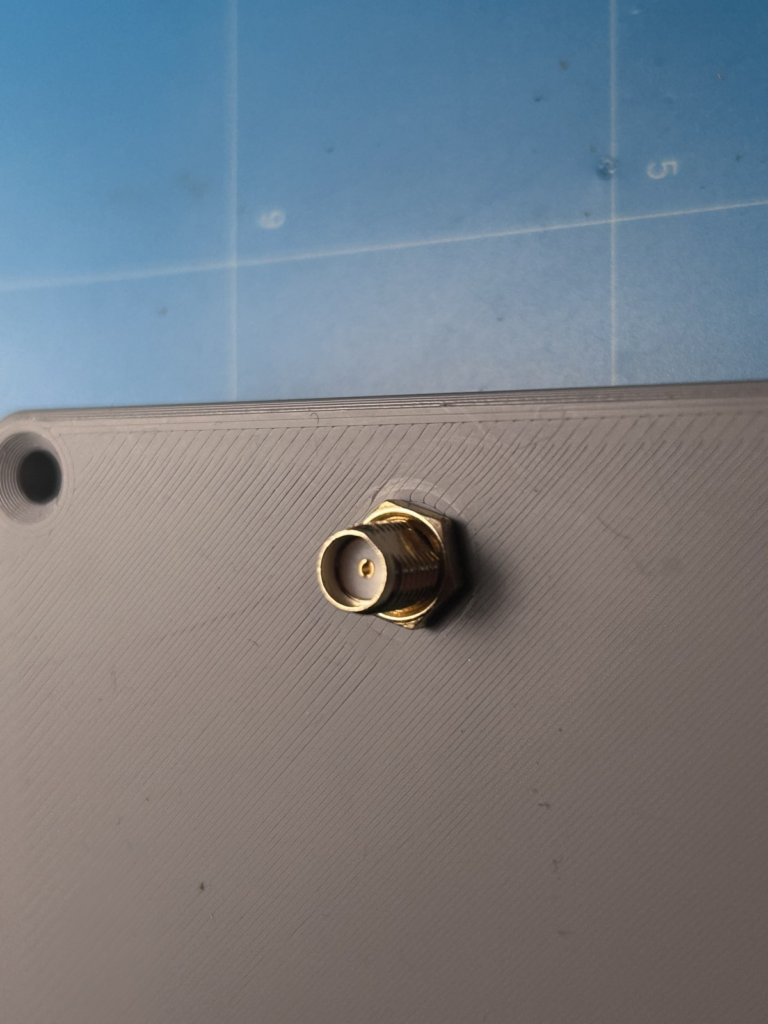
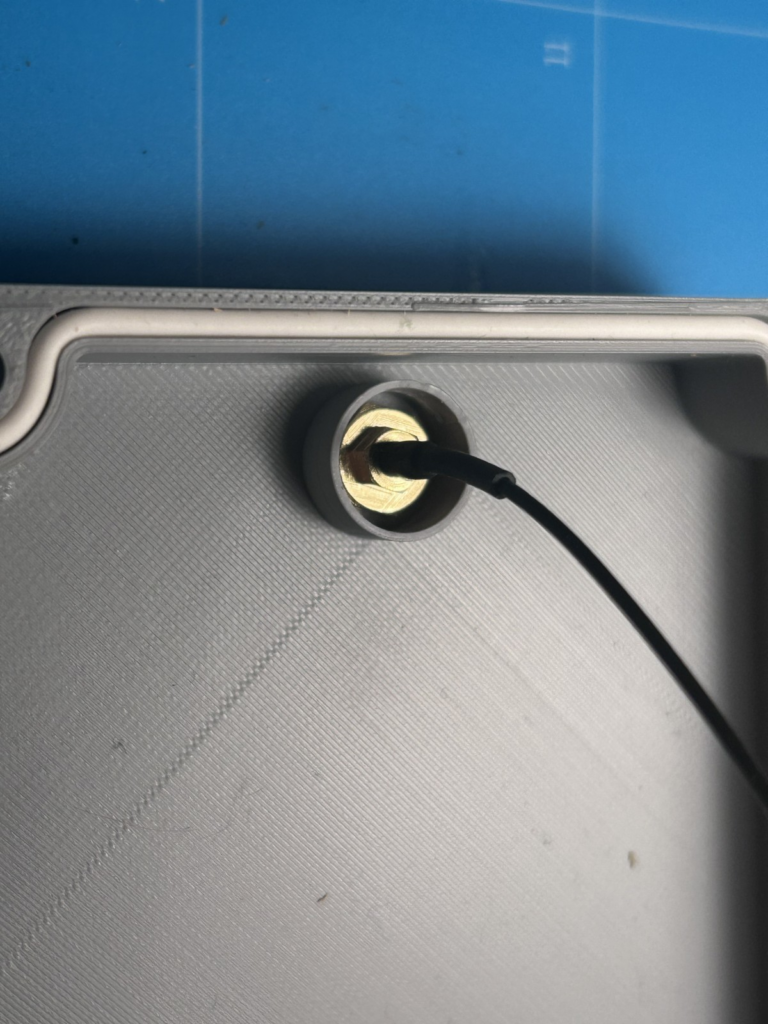
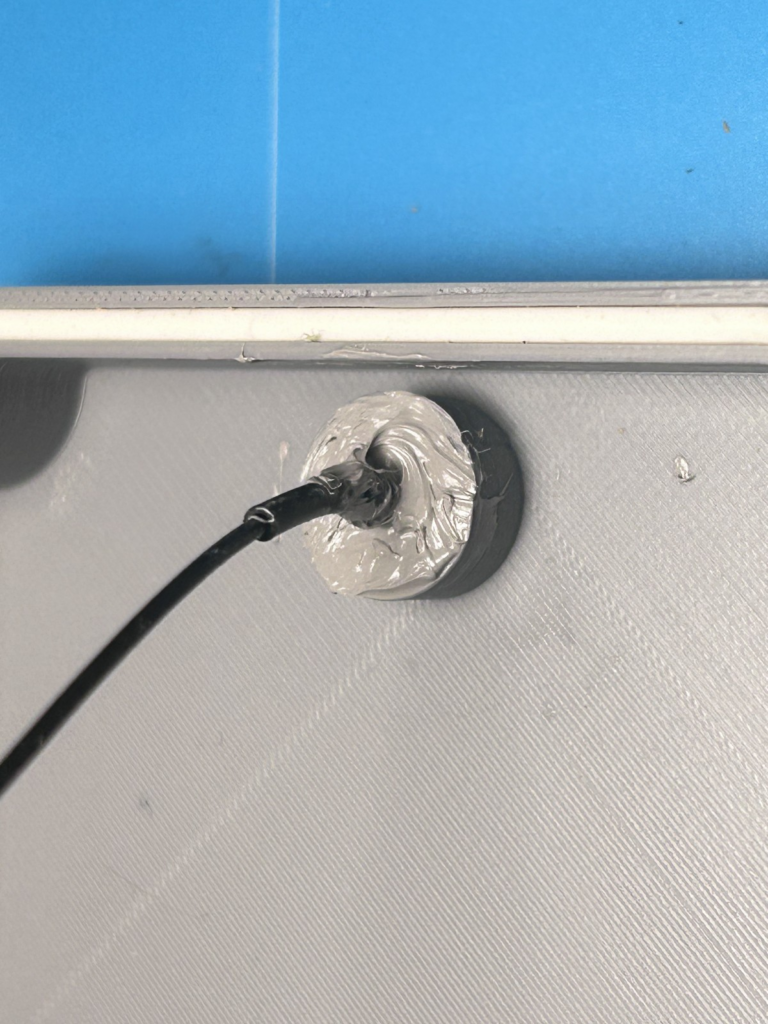
From the inside, the entire ring is now filled with the Sikaflex 522 grey sealant and adhesive and smoothed out with a small spatula (ice cream stick, skewer or similar). To do this, you can put some adhesive on a sheet of paper, pick it up from there with the spatula and then spread it in the sealing ring. Sikaflex 522 is a one-component polymer-based sealant and adhesive (not silicone) that was developed specifically for outdoor use (e.g. on motorhomes). It is resistant to moisture and UV light. It is very important to work carefully here, otherwise the housing will leak later.
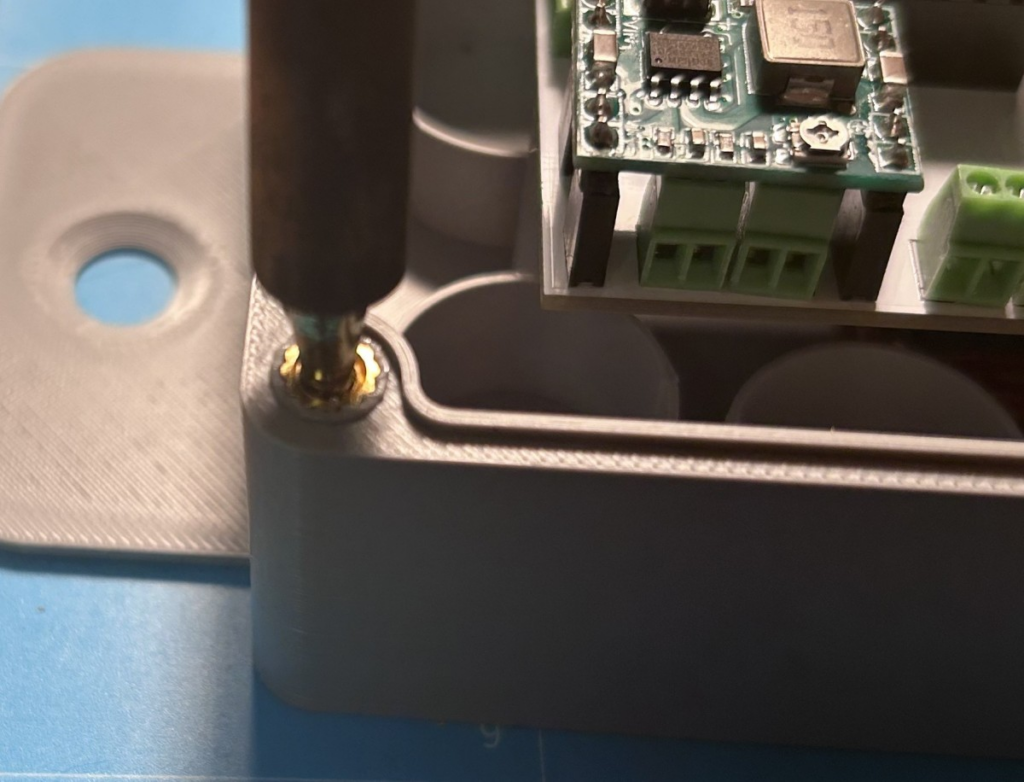
Next, the four M4 brass press-in nuts / threaded inserts are melted into the housing. This is done with the soldering iron. To do this, preheat the soldering iron to maximum temperature. Now screw one of the M4 screws lightly into the threaded insert and use it to place the insert straight onto the prepared hole in the lower housing part. One of the serrated edges of the brass insert should be at the top. Once the press-in nut sits straight, remove the screw again. Now carefully press the tip of the soldering iron into the threaded insert. It heats up immediately and melts the surrounding plastic. With slight pressure you can now press the sleeve into the material; the sleeve is pressed approx. 1 mm below the upper edge of the housing. Repeat this for all 4 threaded inserts.
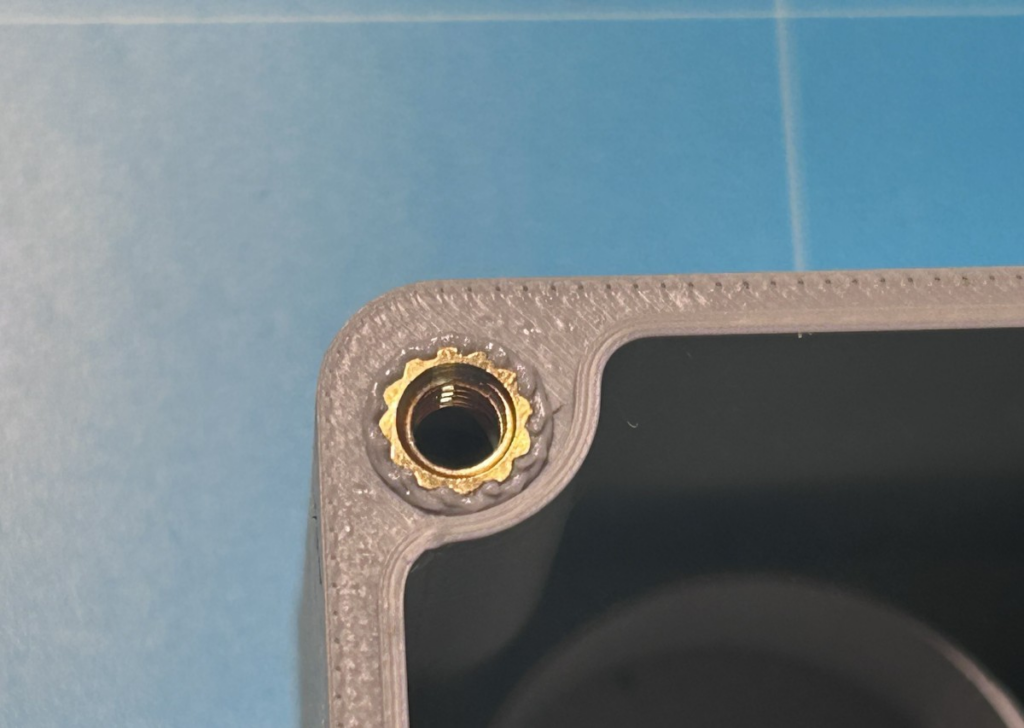
The bulge created when melting in the sleeve must now be cut off carefully (!) with a sharp cutter knife so that the surface is flat again. Make absolutely sure not to damage the circumferential tongue (for the groove in the housing cover)! You have to work cleanly here, otherwise the housing will not be watertight later.
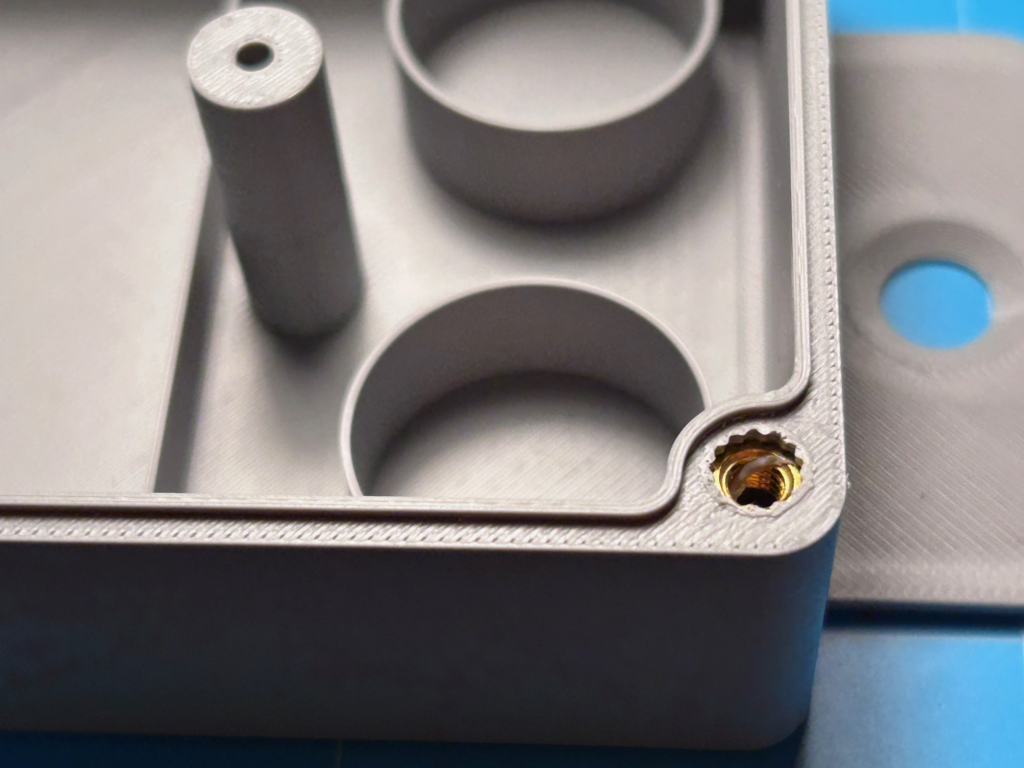
Now the holes for the required cable glands are drilled into the lower housing part. The housing comes with only one prepared hole for the power supply cable, because the WeatherLox weather station has a modular design and the housing therefore has to be correspondingly flexible. Ideally, all holes for all sensors that are to be used and connected later are drilled at this point. Adding holes later is possible at any time, but involves corresponding effort. The guide for each sensor contains details on the cable and the cable gland. The required cables and cable glands are included in the kits.
The following drilling template can be used to mark the holes:
First, each hole is pre-drilled from the outside with a 4-6 mm wood drill. Then the actual hole is drilled with the 12mm countersink – also from the outside to the inside. A 12 mm wood drill instead of the countersink is not suitable – it frays the hole badly. If you don’t have a countersink (it only costs a few euros…), you can also drill with an 8 mm drill and then use a step drill to widen the hole to 12 mm.
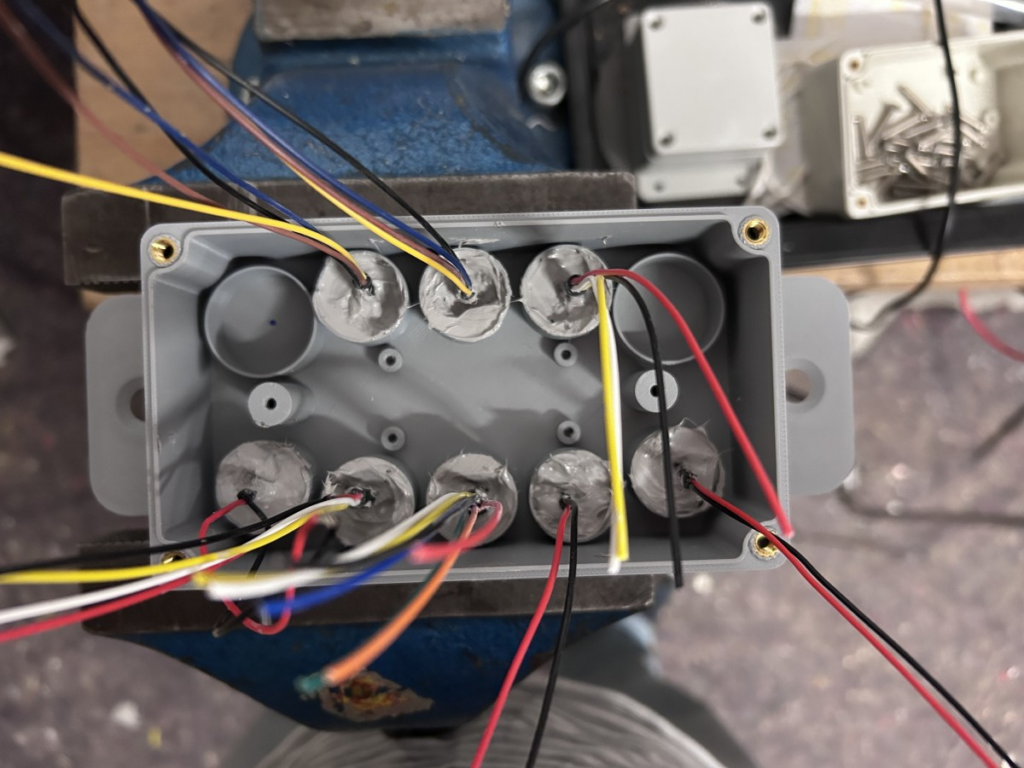
Once all holes have been drilled, the cable glands are screwed in hand-tight. Each cable is now stripped for 10 cm and then inserted into the housing through the cable gland. It is pushed through until the cable sheath protrudes approx. 2 mm above the potting ring.
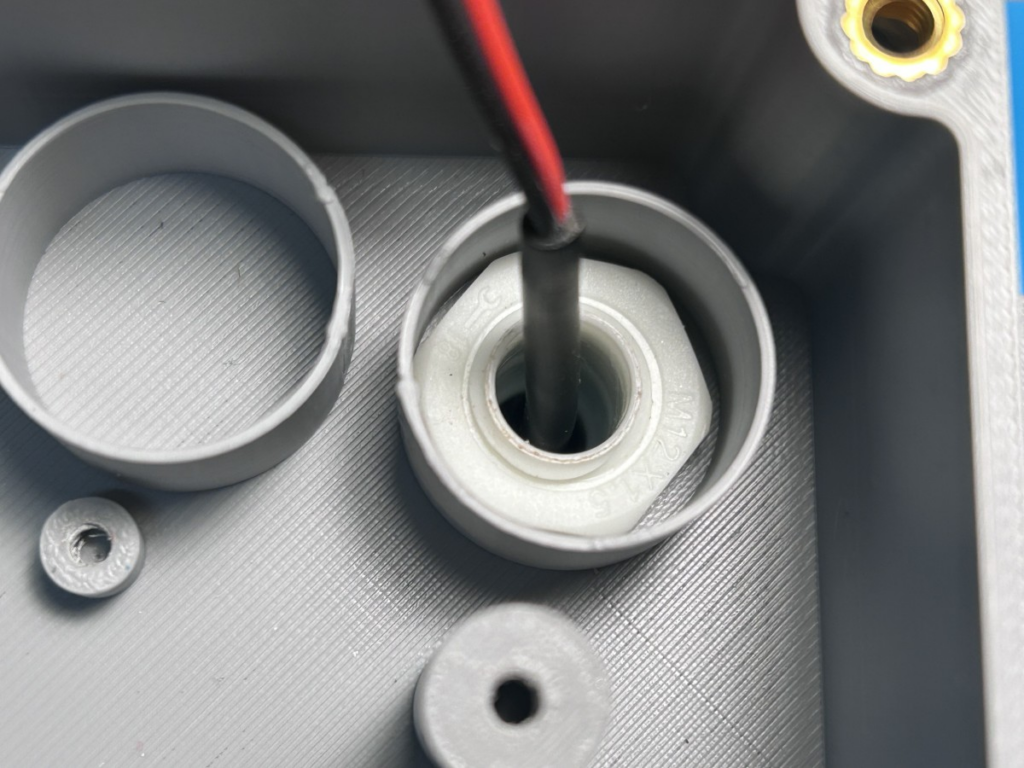
Now the cable gland is fixed and then all cable glands are filled with the Sikaflex 522 grey sealant and adhesive. You can use the caulking gun directly for this. First fill the actual cable gland with sealant, bending the cable slightly from left to right so that the entire cable gland is filled with sealant. Then the potting ring is completely filled with sealant and smoothed out with the spatula.
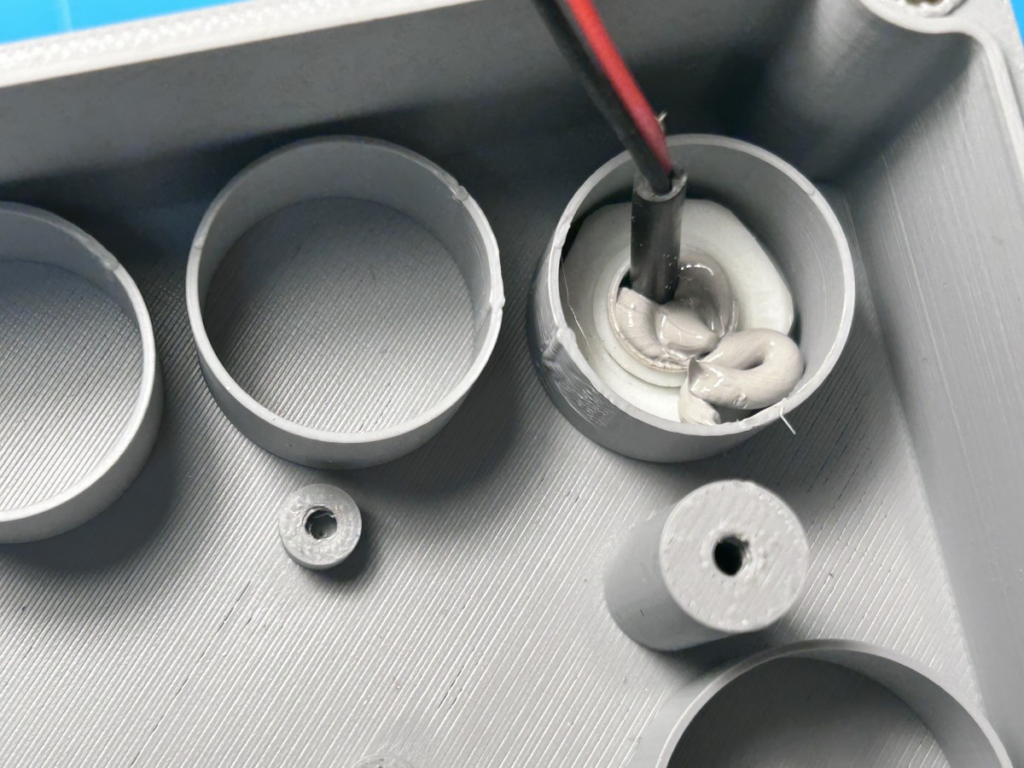
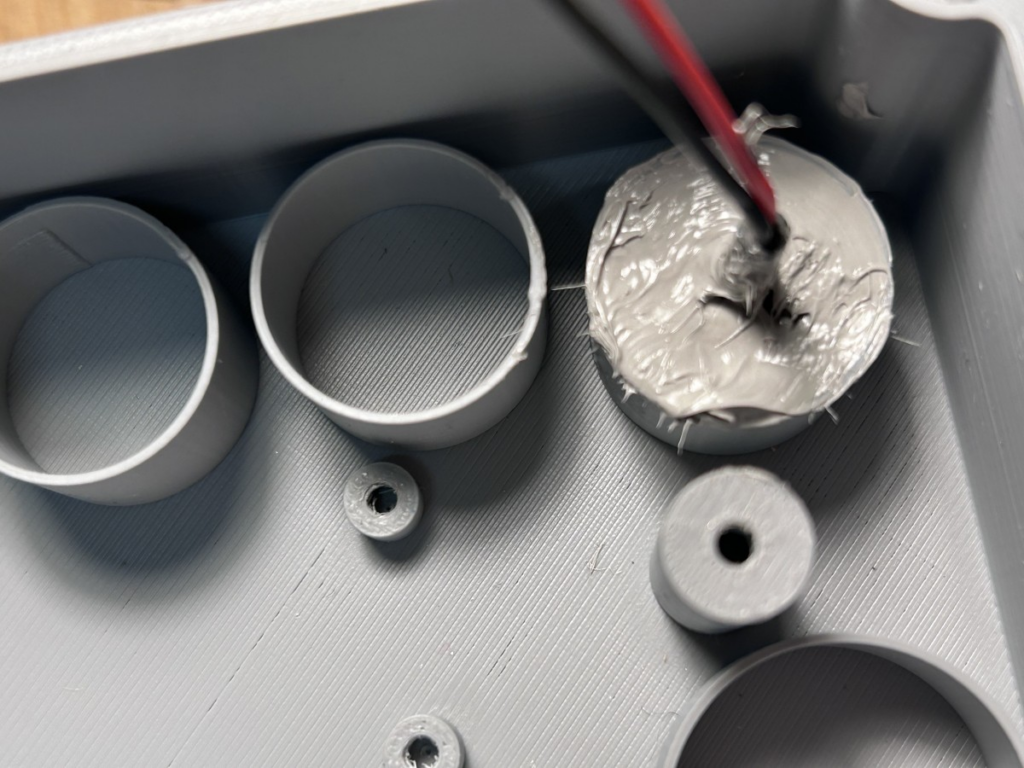
In the end, all glands should be completely filled. Now everything has to dry for 1 day.
Note: If the heating for the rain gauge is also to be installed, you can now first jump to the assembly instructions for the heating and mount the relay or MOSFET module on the bottom of the housing. Then continue here.
Now the PCB can be mounted in the housing with the two M3x10mm screws. The PCB is mounted so that both the MP1584EN module and the power supply cable are at the bottom left. Now connect the two power supply wires to the PCB at the terminals “+12V” and “GND” (the MP1584EN module has to be removed from the socket again for this).
The connection of the other cables and sensors is described in the respective chapter of the sensor. From here, jump to the description of the respective sensor. In terms of sequence, it makes sense to first connect the cable in the control unit and then route it along the mounting system. Only when you have determined the position of the sensor on the mounting system do you shorten the cable accordingly.
The housing is now mounted on the mounting system with the pipe clamps. To do this, insert the two M8x20mm countersunk screws from above into the side brackets. From below, follow with a washer and an M8 nut, with which the screw is first tightened hand-tight. Then screw the pipe clamp firmly onto the screw from below. Now turn the screw until the right position is reached and then tighten the nut firmly.

The housing is mounted on the main strut of the mounting system, vertically below the first cross member. The power supply cable points downwards.
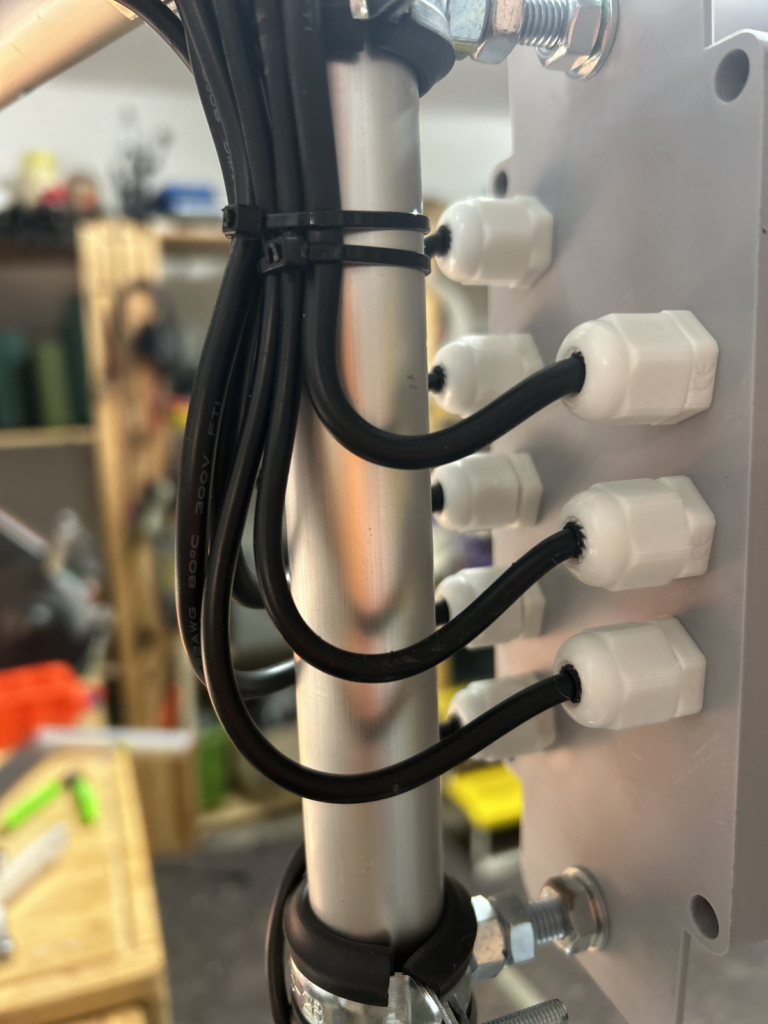
The remaining cables are secured to the mounting system with the cable ties so that they form a downward loop before being routed upwards. This ensures that rainwater collecting on the cables is directed away from the cable glands and thus away from the housing.
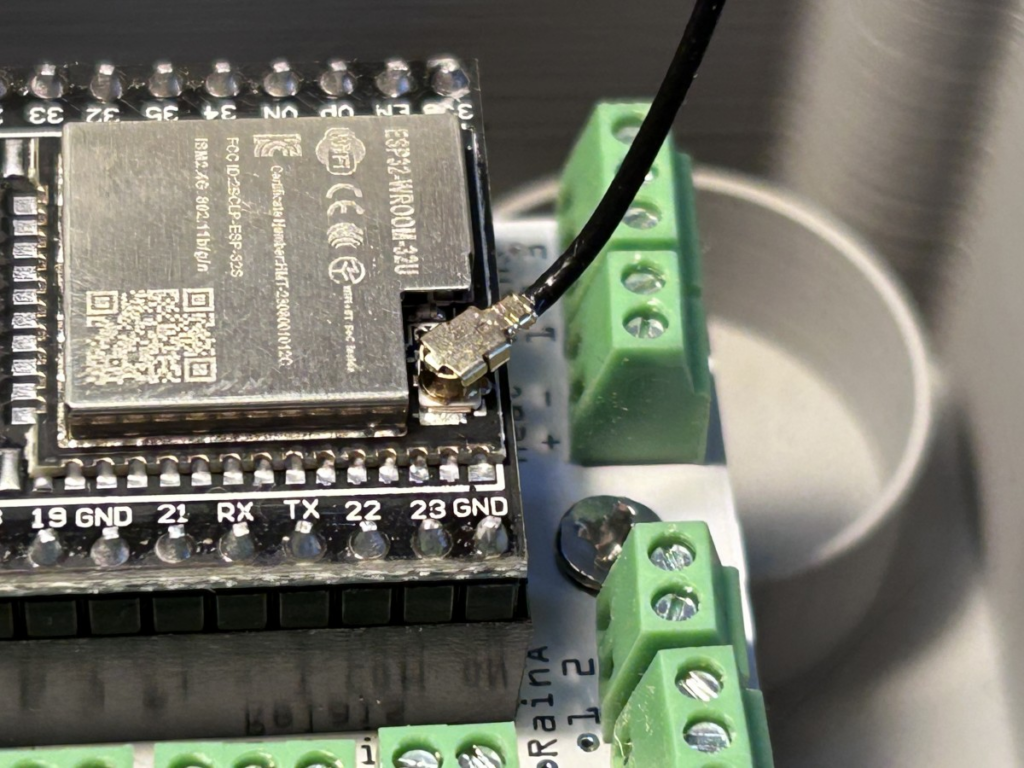
Finally, the antenna is connected to the ESP32. To do this, plug the small connector on the cable onto the antenna socket on the ESP32. Proceed carefully so as not to damage either the socket or the cable.
Then the cover is placed on the housing and screwed tight crosswise with the M4x20mm screws. Make sure that neither the silicone cord seal has slipped nor that cables are accidentally pinched.
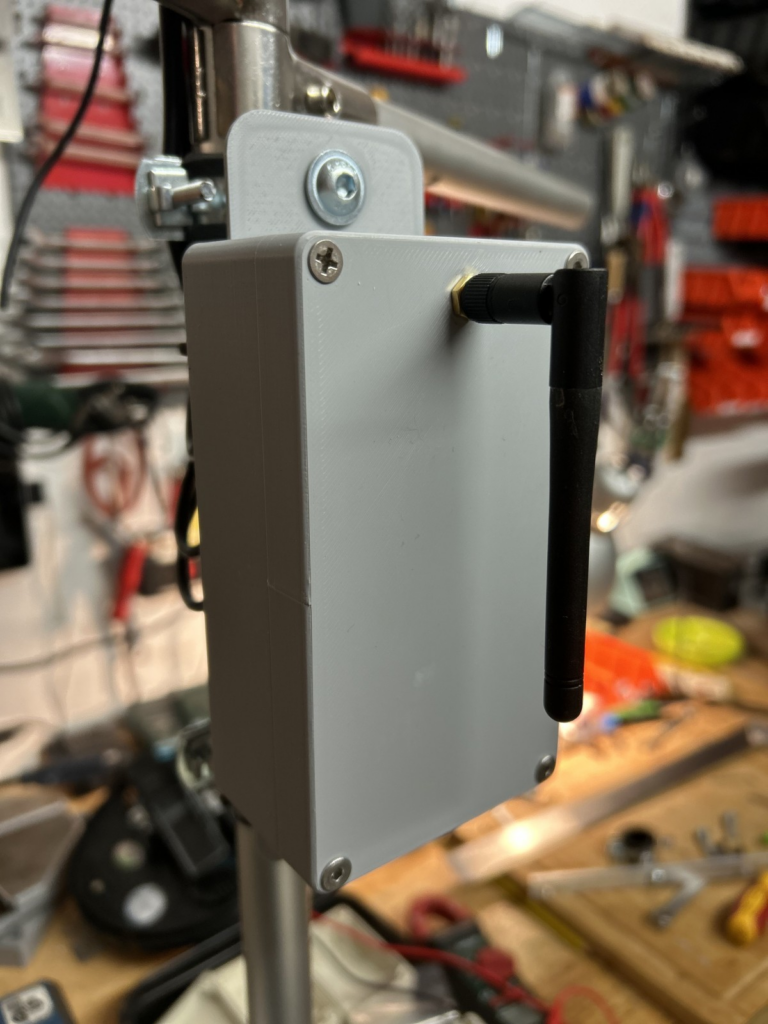
This completes the assembly. The software setup is described in the Software section.