Introduction
The Air Sensor Module records the air temperature (thermometer), the relative humidity (hygrometer) and the absolute air pressure (barometer).
The temperature measurement should be free from environmental influences. A relatively open location with sufficient distance from buildings or tall vegetation, on a ground that is natural for the region (usually a short-cut grass area), is best suited for this. By default, the air temperature is always measured at a height of two metres above the ground. However, the measurement does not take place in direct sunlight, but shaded by a modern, well-ventilated plastic louvred radiation shield. (Source).
In a weather station, the hygrometer usually records the relative humidity in %. The same applies to the location of the hygrometer as to the thermometer. The hygrometer is therefore usually located in the same weather hut or the same radiation shield as the thermometer.
The air pressure is measured with a barometer. The air pressure can be used, for example, to detect changes in the weather. A falling air pressure often indicates worse weather (low pressure) and a rising air pressure good weather (high pressure). The air pressure depends on the altitude. On weather maps or in weather data from official stations you will always find the “reduced” or relative air pressure, which has been converted to sea level. So if you want to compare the air pressure you measure yourself with other stations or values, you have to use the reduced air pressure. (Source).
Available measurements
With the Air Sensor Module, the following values are available at the weather station:
| Variable | Unit | Source | Description |
|---|---|---|---|
| temperature | °C | Measurement | Outside temperature |
| temperature_avg2m | °C | Calculated | Ø temperature 2 min |
| temperature_avg10m | °C | Calculated | Ø temperature 10 min |
| dewpoint | °C | Calculated | Dew point |
| feelslike | °C | Calculated | Feels-like temperature |
| heatindex | °C | Calculated | Heat index |
| humidity | % | Measurement | Rel. humidity |
| humidity_abs | g/m³ | Calculated | Abs. humidity |
| pressure_abs | hPa | Measurement | Air pressure absolute |
| pressure_rel | hPa | Calculated | Air pressure relative |
| pressure_trend_1h | Calculated | Air pressure trend 1h | |
| pressure_trend_3h | Calculated | Air pressure trend 3h | |
| pressure_change_1h | hPa | Calculated | Air pressure change 1h |
| pressure_change_3h | hPa | Calculated | Air pressure change 3h |
| vapourpressuredeficit | hPa | Calculated | Vapour pressure deficit |
| cloudbase | m | Calculated | Cloud base (cumulus) |
Sensor used
The weather station can be operated with 3 different sensors. Depending on the accuracy requirements, you choose from the following types:
Sensor BME280
It can record all 3 measured variables (temperature, humidity and air pressure) and is very widespread. The sensor is made by Bosch. The sensor measures decently and is well suited for pure smart home use. For amateur meteorologists, however, the deviations are quite high, especially at cold temperatures (below 0 degrees) and at high humidity >90% (+/-2 degrees C). This is because the sensor measures the temperature in its chip and thus partly also records the operating temperature of the chip. Otherwise it can measure temperatures with +/- 0.5 degrees, the accuracy of the humidity is +/- 3%. This sensor was not actually designed for use in unprotected outdoor areas. In this guide it is therefore specially protected against moisture (condensation) as well as dirt and dust.
Datasheet
Specification
- General:
- Operating voltage: 1.71 – 3.6V
- Humidity
- Response time (τ63%) 1s
- Accuracy tolerance ± 3 % relative humidity
- Hysteresis ≤ 2 % relative humidity
- Air pressure
- Pressure range 300 … 1100 hPa (equiv. to +9000…-500 m above/below sea level)
- Relative accuracy ±0.12 hPa, equiv. to ±1 m (950 … 1050hPa @25°C)
- Absolute accuracy typ. ±1 hPa (950 …1050 hPa, 0 …+40 °C)
- Temperature
- Operating range Operational -40°C – +85°C
- Full accuracy 0°C – +65°C with ± 0.5°C
Sensor SHT30
The SHT30 records temperature and humidity. The sensor is made by the Swiss company Sensirion. To record the air pressure, the inexpensive BMP280 sensor from Bosch is also installed. The SHT30 also meets the demands of amateur meteorologists – it provides highly accurate readings over the entire measuring range: temperature with +/- 0.2 degrees, humidity with +/- 2%. The sensor is designed specifically for outdoor use and is protected accordingly. If you want to record accurate weather data in winter as well, you should use at least the SHT30.
Datasheet
Specification
- Fully calibrated, linearized, and temperature compensated digital output
- Wide supply voltage range, from 2.15 V to 5.5 V
- I2C Interface with communication speeds up to 1 MHz and two user selectable addresses
- Typical accuracy of 2.0 %RH and 0.2 °C for SHT30
- NIST traceability
- Very fast start-up and measurement time
Sensor SHT35
Like its little brother SHT30, the SHT35 records temperature and humidity. The sensor is made by the Swiss company Sensirion. To record the air pressure, the inexpensive BMP280 sensor from Bosch is also installed. The SHT35 also meets the higher demands of amateur meteorologists – it provides highly accurate readings over the entire measuring range and, compared to the SHT30, is even more accurate in humidity – especially in the range > 90%: temperature with +/- 0.1 degrees, humidity with +/- 1.5%. The sensor is designed specifically for outdoor use and is protected accordingly. If you value more accurate humidity readings, especially in the high range, you should choose the SHT35 over the SHT30.
Datasheet
Specification
- Fully calibrated, linearized, and temperature compensated digital output
- Wide supply voltage range, from 2.15 V to 5.5 V
- I2C Interface with communication speeds up to 1 MHz and two user selectable addresses
- Typical accuracy of 1.5 %RH and 0.1 °C for SHT35
- NIST traceability
- Very fast start-up and measurement time
Parts list
Available as a kit
All necessary components of this guide are also available as a complete kit! The kit contains all individual components (except adhesives, solder, etc.), including the required PCBs and 3D printed parts. With your purchase you also support us in the further development of the DIY weather station.
Request a kit ›The following components are required to assemble the sensor module:
| Quantity | Component | Source |
|---|---|---|
| 1 pc. | Misol / Ecowitt weather shield | Ali Express / Amazon |
| 1 pc. | 3D printed adapter for the weather shield | see below |
| 1 pc. | PCB Air Sensor Module | see below |
| 4 pcs. | Stainless steel countersunk screw Phillips, M3x10mm | Ali Express / Amazon / hardware store |
| 2 pcs. | Stainless steel countersunk screw Phillips, M3x12mm | Ali Express / Amazon / hardware store |
| 2 pcs. | Cable gland IP68, PG07 (M12) | Ali Express / Amazon / hardware store |
| 1 pc. | Swivel pipe clamp, 25-28mm / 3/4″ | Ali Express / Amazon / hardware store |
| 1 pc. | Stainless steel countersunk screw DIN7991, M8x30mm | Ali Express / Amazon / hardware store |
| 2 pcs. | Stainless steel hex nut M8 | Ali Express / Amazon / hardware store |
| 1 pc. | Stainless steel washer M8x16x1.5mm | Ali Express / Amazon / hardware store |
| 4 pcs. | PCB screw terminals, 2 pin, 2.54mm | Ali Express / Amazon |
| 1 pc. | Female header, 1×6 pin, 2.54mm | Ali Express / Amazon |
| (1 pc.) | Option: BME280 temperature humidity air pressure sensor | Ali Express / Amazon |
| (1 pc.) | Option: SHT30 (ComWinTop) temperature humidity sensor | Ali Express / Amazon |
| (1 pc.) | Option: SHT35 (ComWinTop) temperature humidity sensor | Ali Express / Amazon |
| (1 pc.) | Option: BMP280 air pressure sensor | Ali Express / Amazon |
| (1 pc.) | Option: cable gland IP68, PG07 (M12) for SHT3x sensor | Ali Express / Amazon |
| 1 pc. | PTFE membrane, 13mm / 0.22µm | Ali Express |
| 2 pcs. | Hex spacer / standoff, M2, Thr 4mm, L 11mm | Ali Express / Amazon |
| 1 m | Stranded cable 4-core, 22AWG, UV-resistant | Ali Express / Amazon / hardware store |
| 4 pcs. | Cable ties 3x150mm, UV-resistant | Ali Express / Amazon / hardware store |
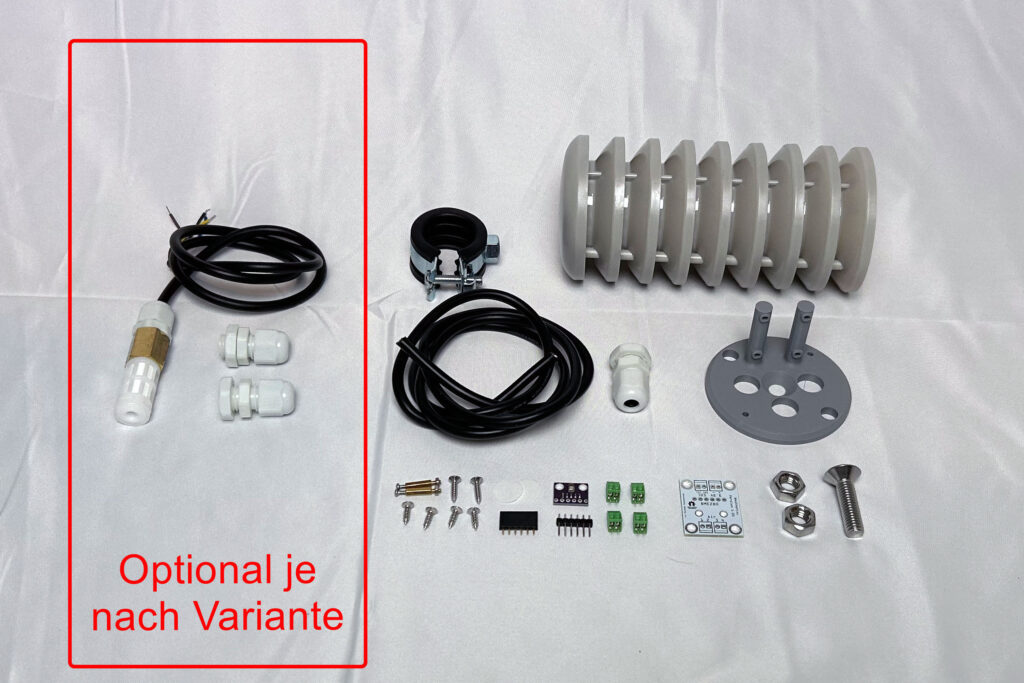
3D printed parts and PCB
Assembly requires a 3D printed adapter for the weather shield. This adapter is of course included in the kit. It can also be printed yourself, but you must make sure to use a weather-resistant, UV-resistant filament. ASA is particularly well suited, but unfortunately it is difficult to print.
The 3D print files can be downloaded here: https://github.com/mschlenstedt/WeatherLox/tree/main/case/weatherlox-air
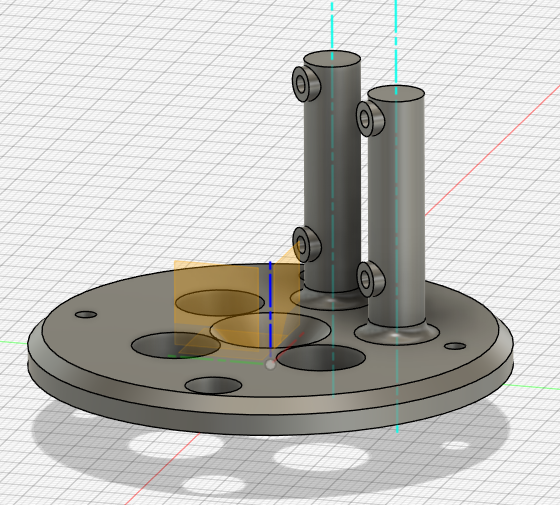
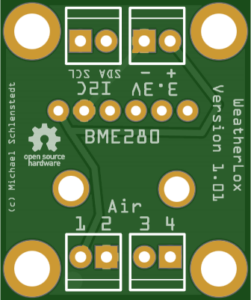
Furthermore, a PCB is required that holds the sensor module and establishes the connection to the Control Module. This is of course also included in the kit. It can also be manufactured by a suitable PCB service. A rebuild on a perfboard is of course also possible.
The files (Gerber files, Fritzing, schematic, etc.) can be downloaded here: https://github.com/mschlenstedt/WeatherLox/tree/main/PCB/weatherlox-air
Required tools and consumables
The following tools and additional consumables are required to assemble the sensor:
- Soldering iron, solder, etc. with the smallest possible soldering tip
- Small needle-nose pliers
- Phillips screwdriver, small
- Slotted screwdriver, mini
- Allen key 5mm
- 13 mm open-end wrench M8
- Wire stripper
- Tweezers and small scissors (nail scissors)
- Paper clip
- All-purpose adhesive (transparent and waterproof!), e.g. UHU or Patex
- PCB protective lacquer (for weather resistance – important!)
PCB protective lacquer is available from electronics retailers or of course from Amazon/Ali Express and the like. Here are some examples:
- https://www.amazon.de/Isolierlack-Elektroniks-Transparent-Leiterplatten-Steuerplatinen/dp/B0G8GBC7WH
- https://www.amazon.de/Schutzbeschichtung-Schaltkreisdichtmittel-Komponentenisolierung-Feuchtigkeitsschutz-Platinenschutzlack/dp/B0G4JYSP42
- https://www.amazon.de/1DFAUL-Dichtungsmittel-feuchtigkeitsbest%C3%A4ndig-zuverl%C3%A4ssigen-elektronischer/dp/B0FH28QD3R
The required Sikaflex 522 adhesive is also available by mail order. You will need it at various points in other build instructions. Here are some examples of where to get it:
- https://www.amazon.de/dp/B09N7J125B
- https://dichtstofftechnik24.de/Shop/Sikaflex-522-1K-Polymer-Kleb-und-Dichtstoff-300ml-Kartusche-versch-Farben_1
- https://www.klebeshop24.de/Sikaflex-522-300-ml-Kartusche-stahlgrau
Assembly instructions
Mount the control unit first
This guide assumes that you already have a working control unit! So, if necessary, start with the control unit before assembling this sensor module.
First, the PCB is assembled. To begin with, the 4 green PCB terminals are soldered onto the PCB. Then the 6-pin female header is soldered onto the PCB.

Now the male header is soldered to the BME280 or BMP280 sensor. The male header must be on the side where the sensor and the other electronic components are located.

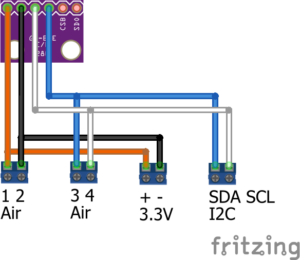
Now the soldering must be tested! This is very important, because the following steps (applying the protective lacquer) cannot be undone! To do this, the control unit is disconnected from the power supply. The BMx280 sensor is plugged into the female header on the Air Sensor PCB (it must point towards the centre of the PCB) and the PCB is temporarily connected to the PCB of the control unit either with the supplied cable or with jumper cables if available. The terminals labelled “Air 1” to “Air 4” on the Air Sensor PCB are connected 1:1 to the terminals “Air 1” to “Air 4” on the PCB of the control unit. A little further down in the guide you will find illustrations showing how the cables have to be connected. If you build the variant with the SHT3x sensor, now also connect this sensor to the terminals labelled “3.3V” and “I2C”. Here, too, there is an illustration with the exact wiring further below. Now the control unit is supplied with power again. After booting, you can log in to the weather station’s interface with a web browser. Switch to the Devices tab and check under task 13 whether the BMx280 sensor is activated (“Enabled”) and also shows readings (note: the BMP280 does not show humidity here – this is correct). Alternatively, you can scan the I2C bus for the sensor by checking under Tools –> I2C Scan whether a BMx280 sensor is found at address 0x76.

If everything is OK, the control unit is disconnected from the power supply again and the Air Sensor PCB and, if applicable, the SHT3x sensor are disconnected again. The BMx280 sensor is now also removed from the female header once more.
Now the PCB protective lacquer is applied to both PCBs – i.e. the PCB of the BMx280 sensor and the PCB of the Air module. Since both PCBs are permanently exposed to the ambient air, this step is very important! Otherwise the PCBs will start to corrode after a short time. The PCBs are coated with the protective lacquer on both sides – but of course leave out all contact pins! The lacquer is very liquid and can be applied very well with a cotton swab by applying a drop and spreading it lightly. Repeat this process until the entire PCB is sufficiently covered with lacquer. But CAUTION! Under no circumstances may lacquer be applied to the actual sensor of the BMx280 (see red outline in the picture below)! If the tiny hole gets clogged, the sensor is broken! Once the lacquer has been applied, soldering is no longer possible!

Once the lacquer has dried completely, continue with the protective membrane for the BMx280 sensor (see red outline in the picture above). A water-vapour-permeable PTFE membrane with a pore size of 0.22 µm is used for this. Two of these membranes are included in the kit (1x spare). First, push the two screws of the hex spacers (standoffs) through the PCB of the BMx280 sensor from above. Then cut two small notches into the sides of the membrane with nail scissors so that the membrane can be clamped exactly between the two screws. Only touch the membrane with tweezers so that it is not clogged by the grease of your fingers.
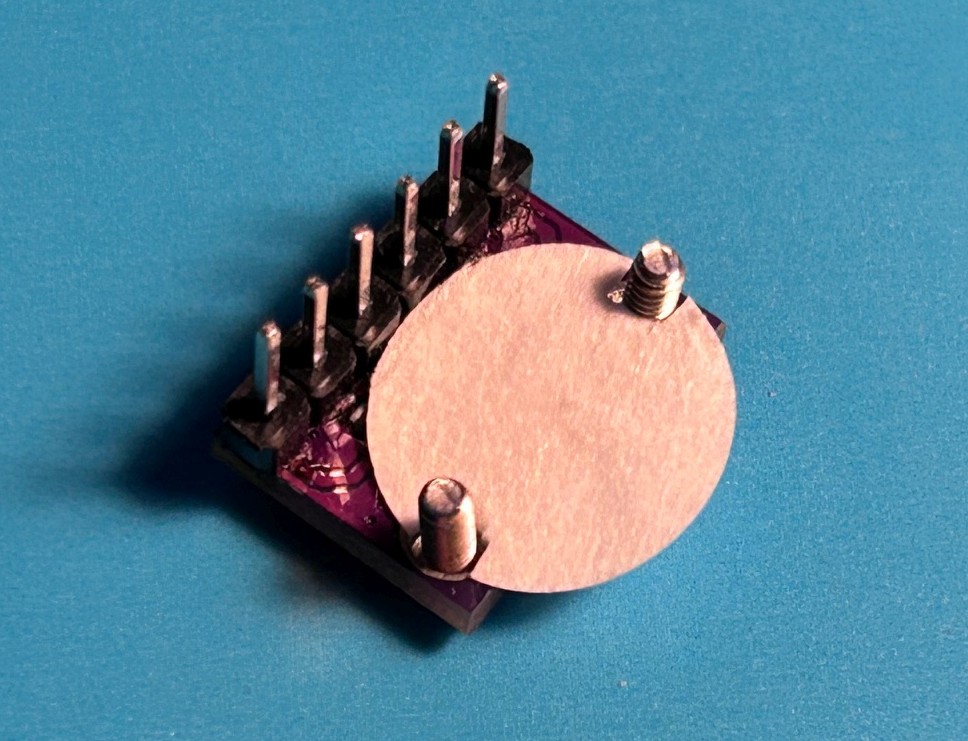
Now the two hex spacers (standoffs) are screwed onto the screws, fixing the membrane at the same time.
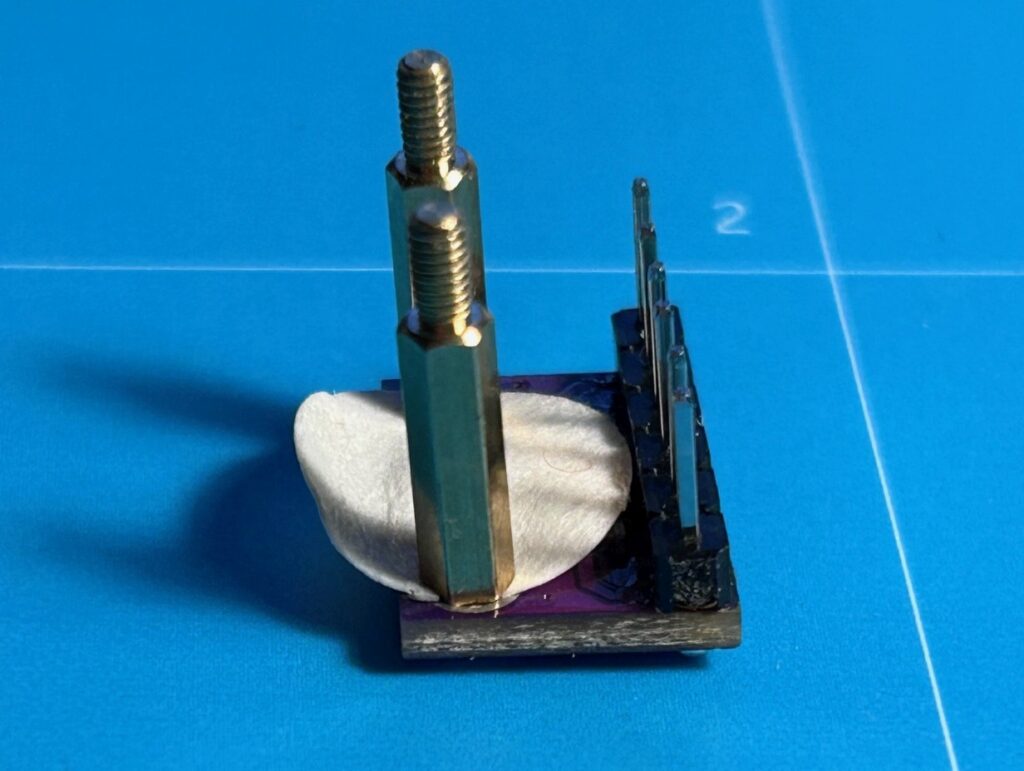
Now one (!) small (!) drop of all-purpose adhesive has to be placed on the top of the PCB at the edge to glue the protruding part of the membrane to the top of the PCB. Fix the membrane with a paper clip until the adhesive has dried firmly. Never use too much adhesive! The membrane must remain permeable to water vapour, otherwise the sensor cannot measure correctly!
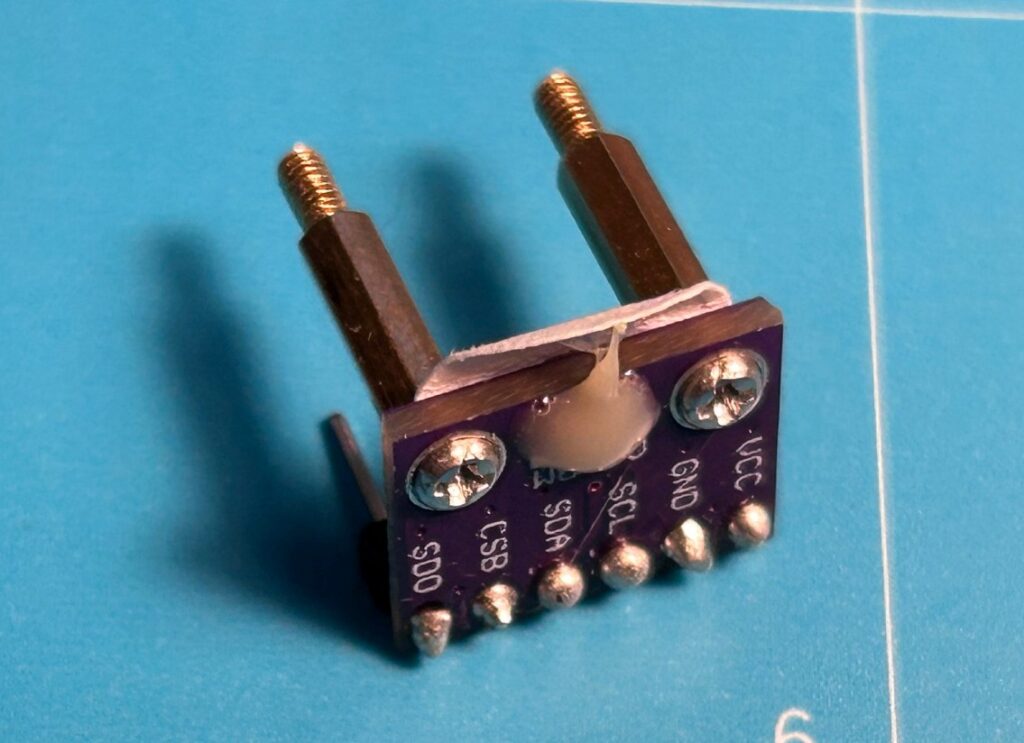
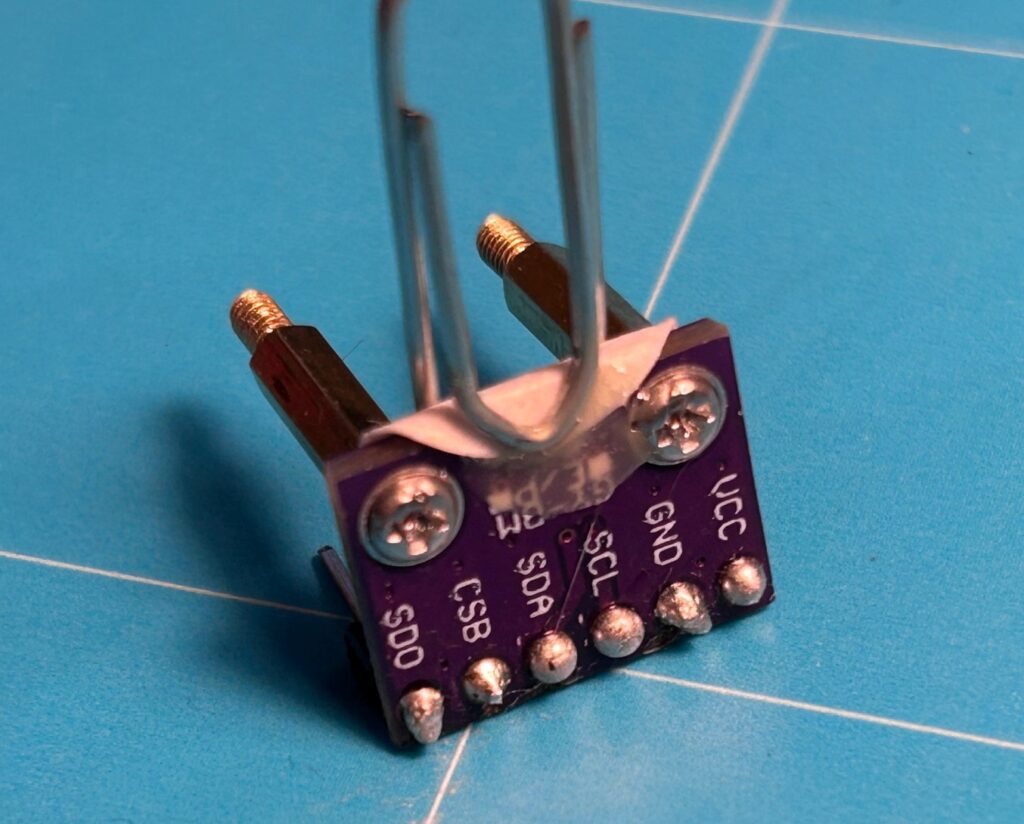
After the adhesive has dried, the paper clip is removed again and the sensor is inserted into the female header on the Air Sensor PCB. The two hex spacers (standoffs) are screwed to the PCB from below with the supplied nuts.
Next, the 3D printed adapter, which will later hold the weather shield and also accommodates the PCB, is assembled. First, the M8x30mm countersunk screw is inserted into the adapter from above and fixed with the nut from below. Now, for the BME280 variant one, and for the SHT3x variant two cable glands are inserted into the adapter from below and screwed in hand-tight from above with the supplied plastic nut. If necessary, you have to loosen the hex nut of the middle screw a little again or remove the caps of the cable glands so that there is enough space to fit the nut – it is quite tight.

The following section is only relevant for the variants with SHT3x sensor. If the BME280 variant is used, the slot for the SHT3x sensor in the 3D printed adapter simply remains empty.
On the SHT3x sensor, the cable gland is carefully unscrewed from the sensor housing. The sensor is inserted from below with the cable gland into the middle hole of the adapter plate and then screwed back together with the sensor housing from above.
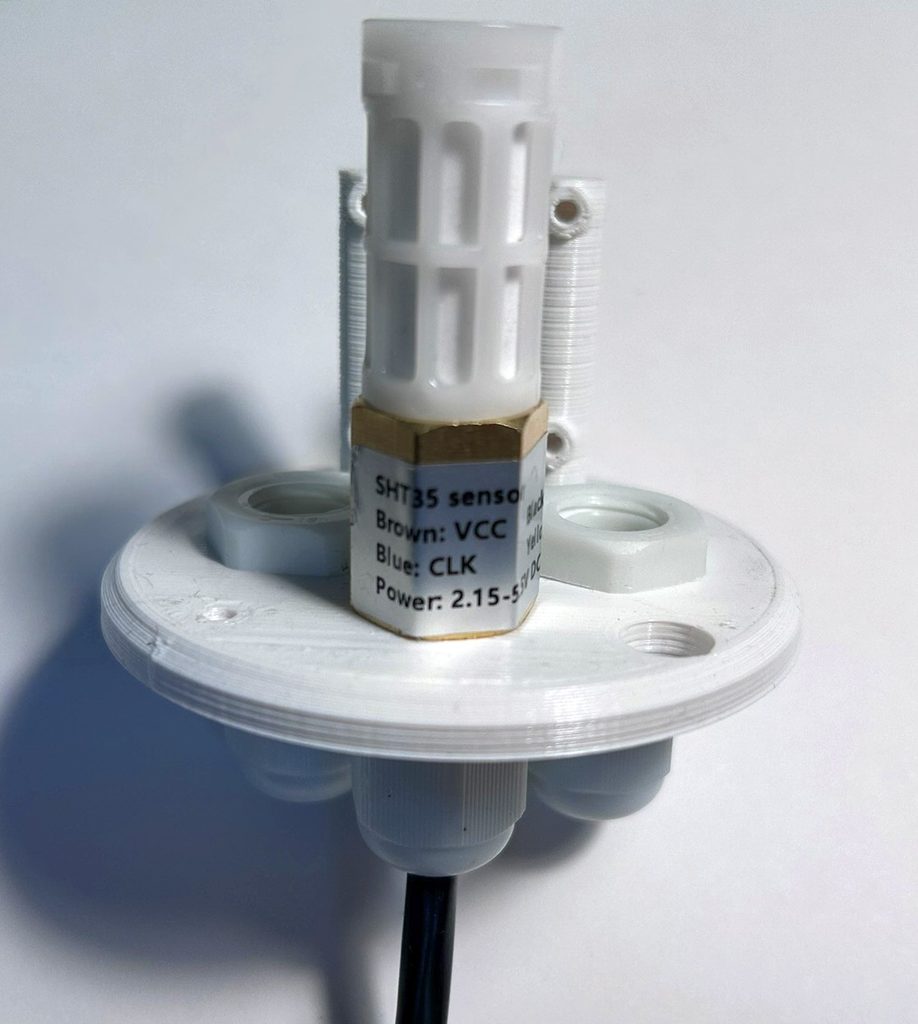
The cable of the SHT3x sensor is now passed through one of the two free cable glands back to the top of the adapter plate.

Now the normal assembly continues (the same for all sensors): The second lock nut is screwed on and then the pipe clamp is mounted. The pipe clamp is firmly locked/screwed with the second lock nut. Turning the cable gland approx. 45° offset to the pipe clamp leaves a little more space for the cable later.
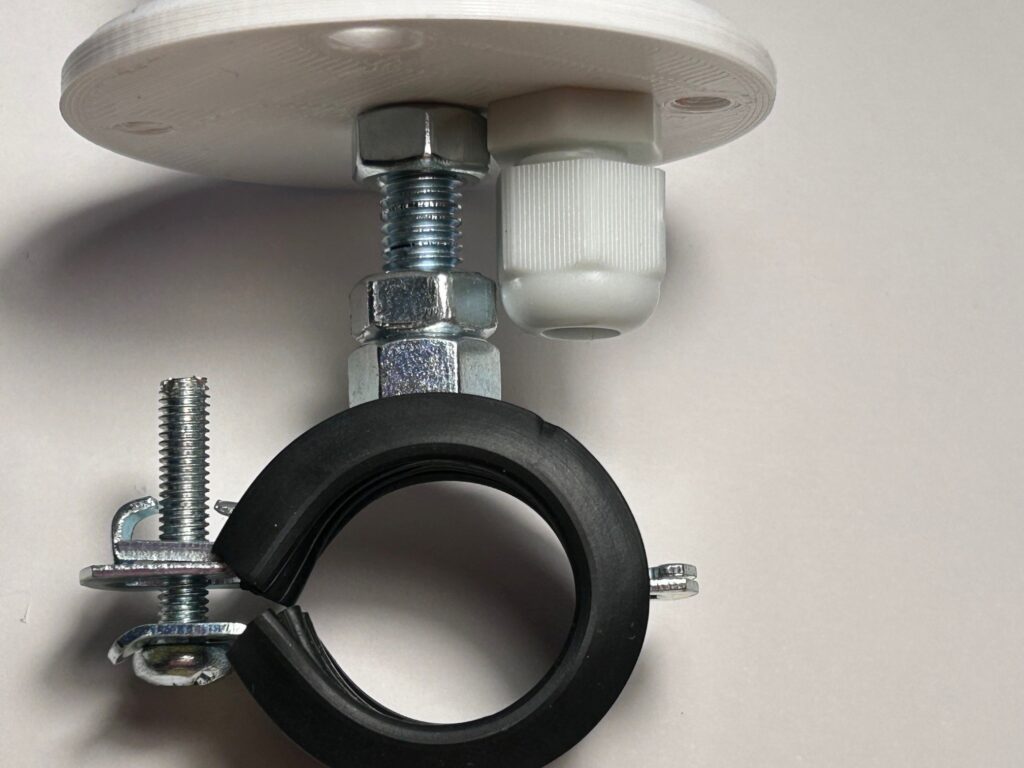
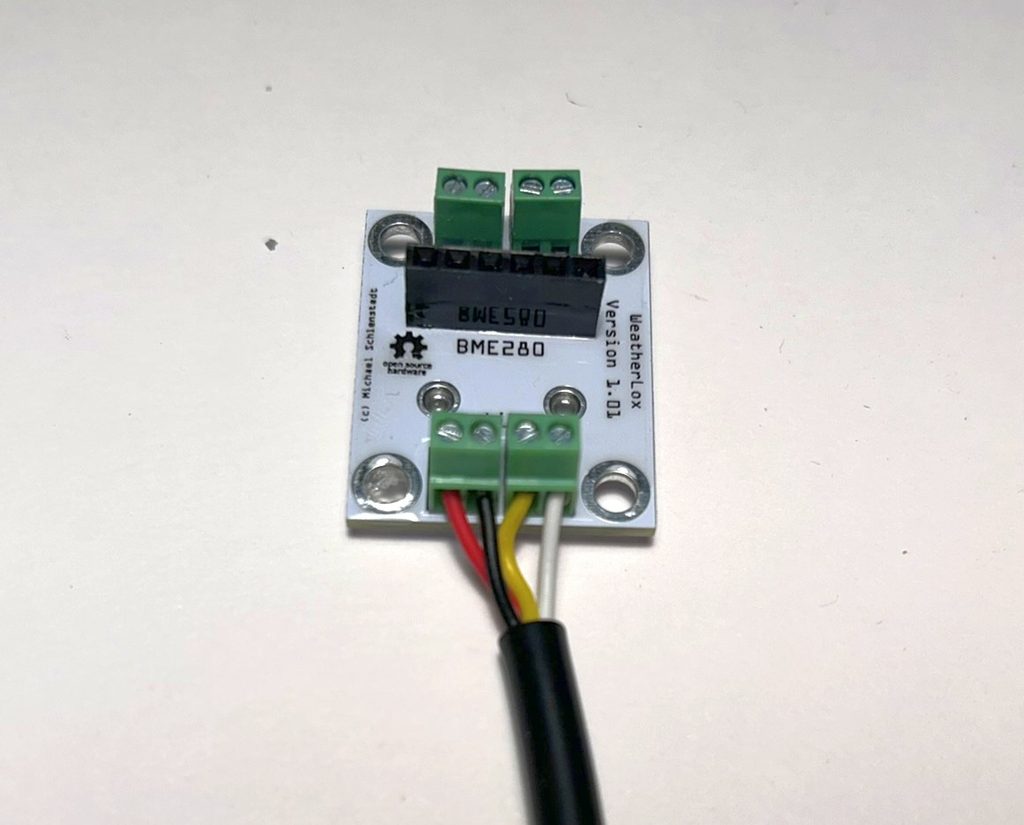
The adapter is now finished. For the connection, the 4-core cable is stripped (only as much as necessary – approx. 20 mm. The protective sheath should remain as far as possible!), passed through the cable gland from below and connected to the terminal blocks of the Air Sensor PCB labelled “Air”.
- Air 1: red
- Air 2: black
- Air 3: yellow
- Air 4: white
If the SHT3x sensor is installed, its cable is now also shortened accordingly and connected to the opposite terminals labelled “3.3V” and “I2C”. The assignment is as follows (to be on the safe side, check the sensor’s type plate again – the cable colours may have changed!):
- 3.3V +: Brown
- 3.3V -: Black
- I2C SDA: Yellow
- I2C SCL: Blue
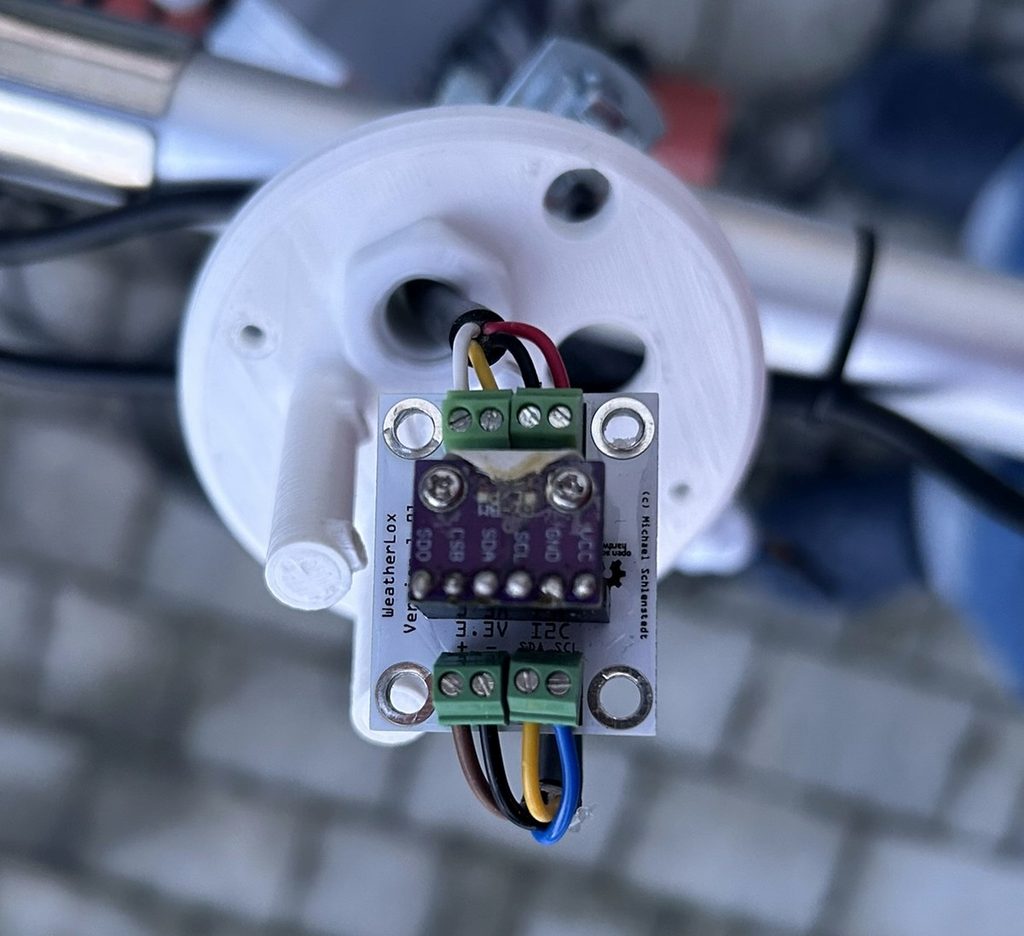
Now the terminals are also potted with PCB protective lacquer after the terminal screws have been tightened firmly and the cable sits securely. Note if the SHT3x sensor has NOT been installed: The terminals labelled “3.3V” and “I2C” are for later extensions and must not be potted (otherwise they would be useless later). Last but not least, the cable is now locked firmly by tightening the cable gland.
Now the Air Sensor PCB is screwed tight onto the 3D printed adapter with the four M3x10mm Phillips screws. Space inside the adapter is rather tight so that the weather shield still fits later. If possible, the cable of the SHT3x (which comes from above) is routed towards the back, so that condensation cannot run down the cable onto the PCB.
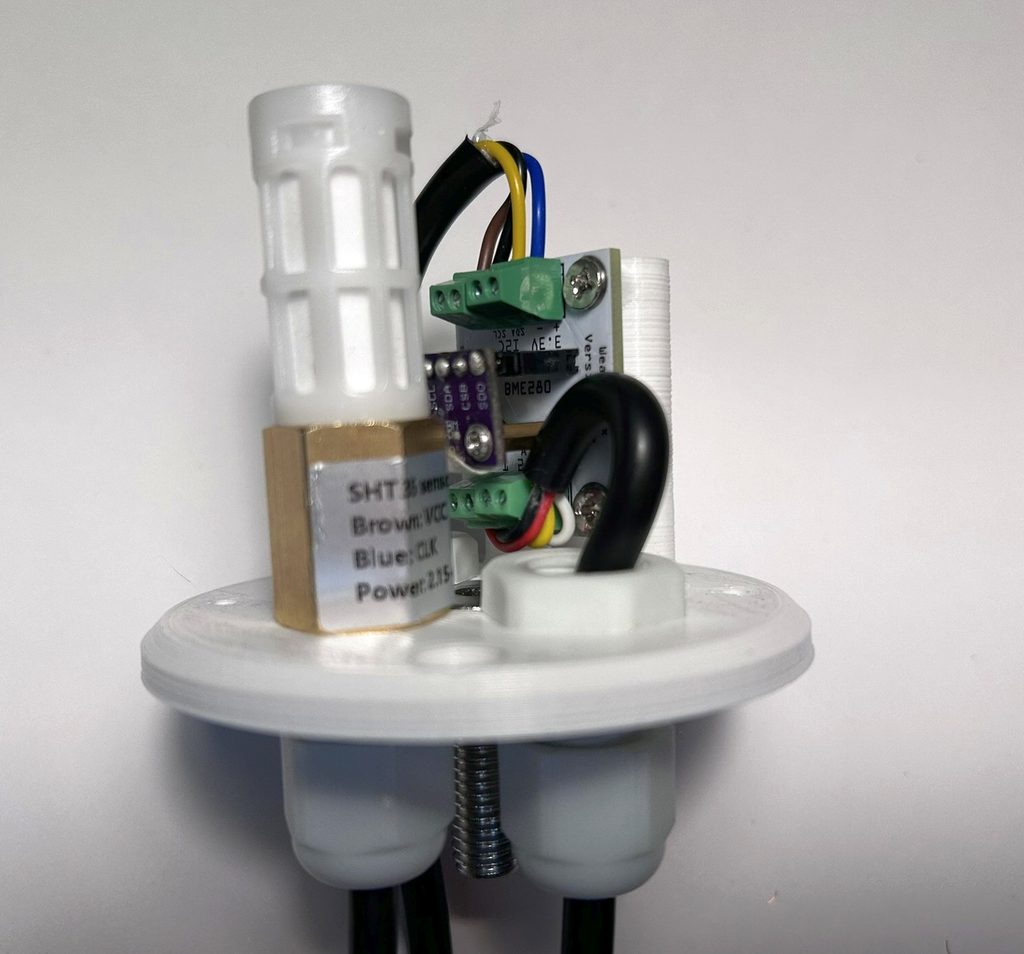
Now the weather shield is placed on the adapter and screwed on with the two M3x12mm Phillips screws. The sensor is mounted with the pipe clamp on the inside of one of the two lower branches of the mounting system.
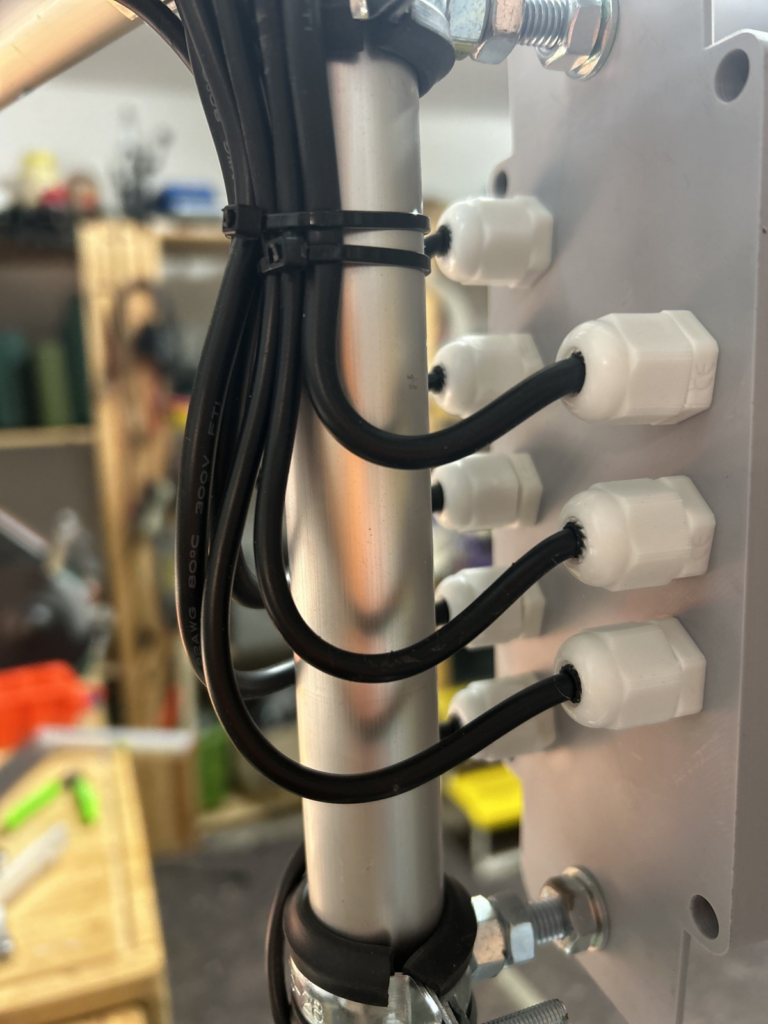
The cable is now routed neatly down to the control unit (note: the cables should only be fixed with cable ties once the assembly of the entire weather station has been completed – this way cables can be bundled). The cable is fed into the control unit with a downward loop. This ensures that dripping water that collects on the cable is directed away from the cable gland. The cable is shortened accordingly and stripped for approx. 10 cm inside. This leaves enough reserve for routing.
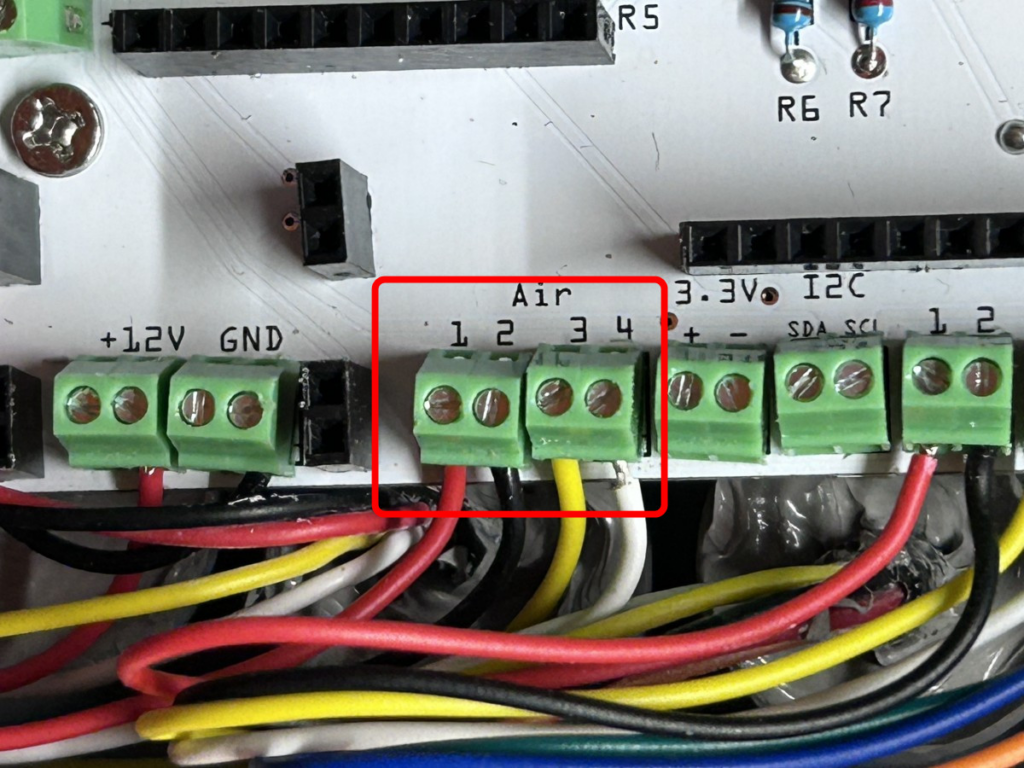
Then the cable is connected to the control unit at the terminals labelled “Air”, in the same way as on the sensor.
- Air 1: red
- Air 2: black
- Air 3: yellow
- Air 4: white
The control unit can now be supplied with power again. Now check once more whether the corresponding readings are displayed in the Devices tab (see above).
Done!