After flashing the image, the control unit is already largely set up: sensors, rules and controllers are prepared. All that remains are the things that differ for every station: the WiFi, time and location and your settings in rules1. Proceed in this order, because everything after the WiFi is set via the web interface of the control unit.
Step 1: Set up WiFi
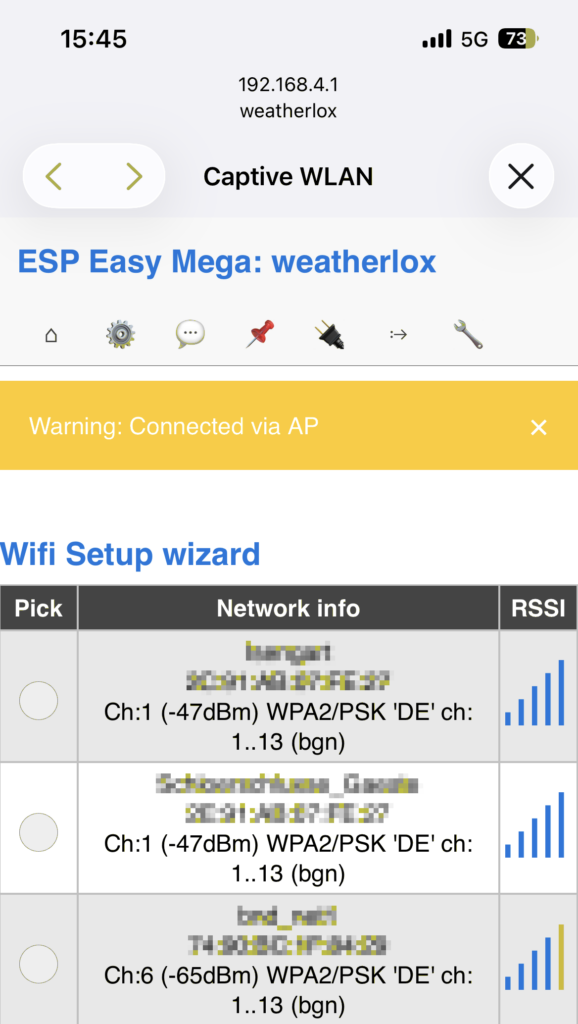
Power up the control unit. As long as it does not know a WiFi network, the ESP32 opens its own WiFi hotspot weatherlox. Connect your phone or laptop to this WiFi. The password for the hotspot is also weatherlox.

The setup page of the hotspot usually opens by itself. If it does not, open http://192.168.4.1 in the browser. Select your own WiFi in the list and scroll to the very end of the list. Enter the password of your WiFi under Password and click on Connect. The ESP32 restarts and connects to your WiFi.

After that the control unit can be reached at http://weatherlox. If the name resolution does not work, look up in your router which IP address the control unit has received and open it in the browser. Log in with the user weatherlox and the password weatherlox. Then change the password in the Config tab under Admin Password and click on Submit.
The hotspot closes again after some time without activity. In that case simply restart the control unit by briefly disconnecting it from power.
If you built the firmware yourself, now load the configuration and rules as described in 1. Initial Firmware Installation under “Step 8: Load configuration and rules”. With the ready-made image this is not necessary.
Step 2: Set the time
The control unit gets the time from the internet (NTP). The correct time is important: the daily values start over at midnight, sun position and sunshine duration depend on the time, and the automatic updates of the rules run at night between 3 and 4 o’clock.
Open the Tools tab and click on Advanced. For Germany everything is already preset:
- Time Source: Use NTP is checked,
de.pool.ntp.orgis entered as NTP Hostname. - DST Settings: Daylight saving time starts on the last Sunday in March (2 → 3 o’clock) and ends on the last Sunday in October (3 → 2 o’clock), DST is checked.
- Timezone Offset (UTC +) under Location Settings: 60 minutes (Central European Time).
If your station is in a different time zone, adjust the timezone offset and the daylight saving rules. You can check whether the time is correct in the Main tab under Local Time.
Step 3: Enter the coordinates
On the same page, enter the location of the station under Location Settings: Latitude and Longitude in degrees with decimals, north and east positive. You can find the coordinates, for example, by right-clicking on the location in Google Maps. The default is 0 for both.

The coordinates are needed for:
- sun position and sunshine duration
- the values from Open-Meteo that the station cannot measure itself: precipitation probability, visibility, evapotranspiration, weather code and cloud cover
- the automatic station height, if no height is entered in rules1 (see step 4)
For the last two points, the control unit sends the coordinates to Open-Meteo. Click on Submit at the very bottom of the page to save time and location.
Step 4: Settings in rules1
The rules calculate the weather data from the measured values. Your own settings are at the very beginning of rules1, between “Set some important variables manually” and “No changes beyond this line!”. Do not change anything below this line. rules1 is never overwritten by the automatic updates, so your settings are kept.
Open the Rules tab and select Rules Set 1 at the top.

The settings in detail (decimal numbers with a point):
stationheight: Height of the pressure sensor above sea level in metres. With0the control unit gets the ground height at the entered location from Open-Meteo.globcoeff(0.92) andbcoeff(0.06): Coefficients for the sunshine duration (explanation). 0.92 fits for Germany. If the station shows too little sunshine, decrease globcoeff, if it shows too much, increase it.sunmin(12): Minimum radiation in W/m² from which sunshine is counted.rainbucket(0.2): Amount of rain in mm per tip of the bucket in the rain amount sensor.savesumvalues(1): Saves the sum values (day, week, month, year) to the WeatherLox server every 5 minutes so that they survive a power failure.0switches this off.getopenmeteo(1): Gets the values from Open-Meteo.0switches this off.winddirsensor(0): Type of wind direction sensor,0for continuous 0–360°,1for 8 directions.autoupdate(1): Updates rules2 to rules4 automatically as soon as there are new rules (at night between 3 and 4 o’clock).0switches this off.
Important: enter the exact station height
From the height, the station converts the measured air pressure to sea level (relative air pressure using the formula of the German Weather Service). An error of one metre falsifies the relative air pressure by about 0.12 hPa. The automatic height from Open-Meteo comes from a terrain model with 90 m resolution and only gives the height of the ground, not that of the sensor. If you know the exact height, enter it: the ground height at the location, for example from your official land survey map service, plus the height at which the pressure sensor is mounted.
After making changes, click on Save at the bottom. The control unit reads the settings at startup. Therefore restart it afterwards via Tools → Reboot.
Sum values after a power failure
Sums such as the amount of rain for the day, week, month and year are only kept in the memory of the control unit and would be lost after a power failure or restart. The control unit therefore sends them to the WeatherLox server every 5 minutes, as long as savesumvalues is set to 1 in rules1:
- rain: day, week, month and year
- solar energy and sunshine duration of the day
- wind run and strongest gust of the day
- number of lightning strikes of the day
After a restart, the control unit first requests the last saved state and only takes over the values that still belong to the current period: the daily values only from the same day, the weekly sum only from the same week (starting Monday), the monthly and yearly sums accordingly. Only then does it start saving again, so that the saved state is not overwritten beforehand. If the server does not answer for 15 minutes, it starts counting again without restoring.
Only these values and the MAC address of the control unit, by which the server recognises the station, are transmitted. Only the last state with the time of saving is stored per station. The transmission is via HTTP. If you do not want this, set savesumvalues to 0.
Note on saving
To protect the flash memory, ESPEasy only allows 100 save operations per day. When the limit is reached, the message “Daily flash write rate exceeded!” appears when saving and the change is not saved. A restart via the web interface does not reset the counter, but briefly disconnecting the power does. Afterwards, first save a different value and then the desired one, otherwise ESPEasy considers the state as already saved and skips saving.
Continue with 3. Setting up the Controllers →