A new firmware version is installed via the web interface of the control unit (OTA update, “over the air”). No USB cable is needed. Only the program is replaced: configuration, rules and WiFi credentials are kept.
Step 1: Create a backup
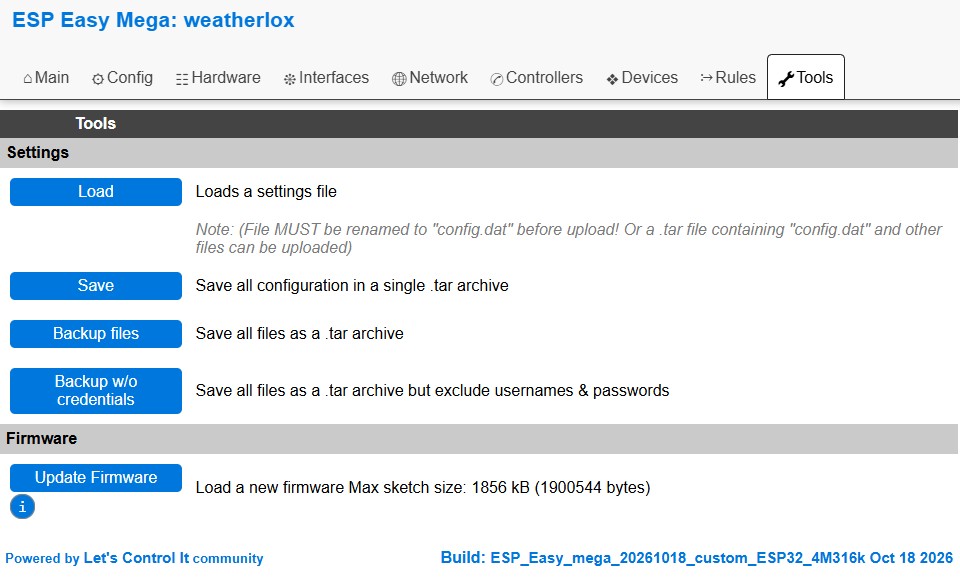
A backup is recommended before the update. In the Tools tab, Backup files saves all files of the control unit as a .tar archive, Backup w/o credentials does the same without user names and passwords.
Step 2: Download the firmware
In the GitHub folder firmware/v0100/bin, download the file without “_full” in its name, currently WeatherLox_20261018_custom_ESP32_4M316k.bin. The full file is not suitable for an OTA update: it is larger than the space for the firmware and is rejected.
Step 3: Install the firmware
In the Tools tab, click on Update Firmware under Firmware. On the following page, select the downloaded file and click on Update Firmware.

The upload takes a moment. The control unit then restarts by itself. Do not disconnect the control unit from power during the update.
The firmware that is running is shown at the bottom of every page of the web interface after Build, for example ESP_Easy_mega_20261018_custom_ESP32_4M316k.